
Blood Strike
MENA Region: Please select the MENA top-up option for accounts registered in this region.
বিকল্প নির্বাচন করুন









বিবরণ
কীভাবে টপ আপ করবেন
- Select Product: Choose your Gold denomination or Strike Pass.
- Enter UID: Enter your Blood Strike UID.
- Make Payment: Confirm your details and complete payment.
- Receive Gold: Check your in-game balance after processing.
About Blood Strike
Blood Strike is a fast-paced first-person shooter battle royale game developed by NetEase. Players can participate in battles with up to 100 players, collecting weapons and equipment across expansive battlefields while competing against other players.
The game features a variety of Strikers with unique abilities and a wide selection of customizable weapons. Players can also use movement mechanics such as gliding, parkour, and ziplines to navigate the battlefield. In addition to the classic Battle Royale mode, the game offers other modes such as Squad Fight, Hot Zone, and Weapon Master, providing a diverse shooting experience.
About Gold
Gold is the premium in-game currency in Blood Strike. It can be used to purchase premium content from the in-game shop, including weapon skins, character cosmetics, exclusive collaboration items, and Strike Passes.
Players can use Gold to unlock various cosmetic items and seasonal rewards, including:
- Weapon Skins: Unlock different weapon appearances and exclusive weapon blueprints.
- Character Cosmetics: Purchase exclusive Striker skins, outfits, and other cosmetic items.
- Limited-Time Collaboration Items: Obtain exclusive cosmetics and limited rewards from in-game collaboration events.
- Strike Pass: Unlock the Elite or Premium Strike Pass to access additional seasonal rewards.
Whether you want to collect your favorite character and weapon skins or unlock more seasonal rewards, Gold gives you more options to customize your in-game experience.
How to Find Your Blood Strike UID?
- Open Blood Strike and log in to the game.
- Tap your profile avatar in the upper-left corner of the main screen.
- Open your profile page to find your UID (User ID).
- Copy your full UID and enter it on the UUTOP top-up page.
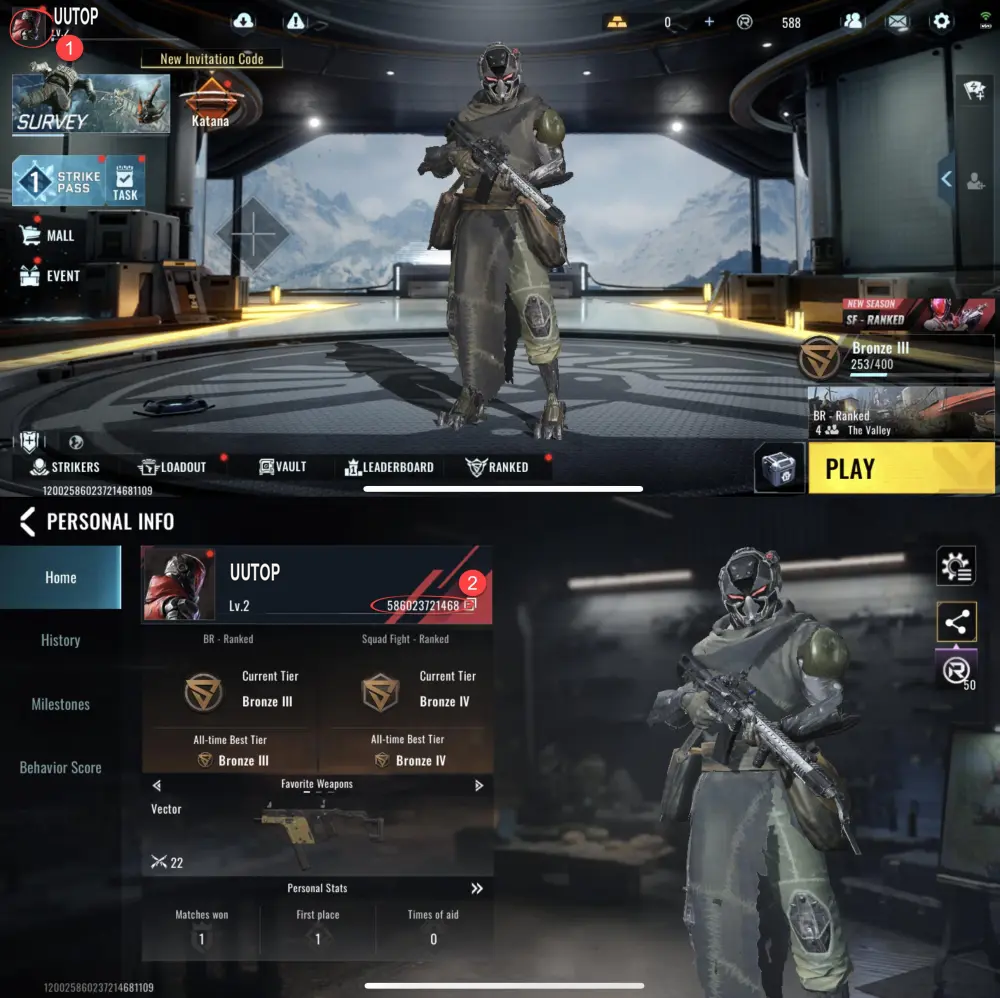
Note: Please use the full UID displayed on your in-game profile, not your character nickname. Double-check your UID before placing an order to avoid topping up the wrong account.
Frequently Asked Questions (FAQ)
Q1: Which platforms does UUTOP support for Blood Strike top-ups?
UUTOP supports Blood Strike accounts on both mobile and PC platforms, including cross-platform top-ups. You only need to provide the correct in-game UID. No game account login is required.
Q2: What is the difference between Global and MENA top-ups?
Global top-ups are intended for Blood Strike Global accounts and do not support MENA accounts. MENA top-ups are intended for Blood Strike MENA accounts. Please select the correct top-up region according to your game version to avoid top-up failures.
Q3: What can Gold be used for in Blood Strike?
Gold can be used to purchase weapon skins, character cosmetics, limited-time collaboration items, and premium content such as Strike Passes. Available items may vary depending on the in-game shop.
Q4: What should I do if my Gold has not arrived after a successful payment?
First, check that your UID and top-up region are correct, then check your in-game Gold balance. If your Gold still has not arrived after waiting, contact UUTOP Customer Support and provide your order number and game UID so our team can help investigate the order status.