You can recharge BIGO Live Diamonds through the app, the official BIGOPay portal, or a supported ID-based service such as UUTOP. The best route depends on your region, available payment methods and whether you prefer an in-app purchase or a direct top-up.
For a UUTOP recharge, select a Diamond amount, enter the correct BIGO ID and complete the payment. No BIGO password or verification code is required. The current Global product is not available to accounts in Malaysia, Singapore or Brunei.
How to Find and Verify Your BIGO ID
Your BIGO ID is shown on your BIGO Live profile. To find it:
- Open the BIGO Live app.
- Tap Me in the bottom-right corner.
- Open your profile.
- Locate the numeric BIGO ID displayed with your account information.
- Copy or carefully record the complete ID.
- Do not rely only on a display name. Names can be changed and may not uniquely identify the receiving account.
- Before payment, compare the ID entered at checkout with the ID shown inside the app. A single incorrect digit can send the Diamonds to another account, and a completed digital delivery may not be reversible.
- If you are buying Diamonds for a friend, ask the recipient to copy their BIGO ID directly from their profile. Confirm the number and selected package with them before placing the order.
How to Top Up BIGO Live Diamonds on UUTOP
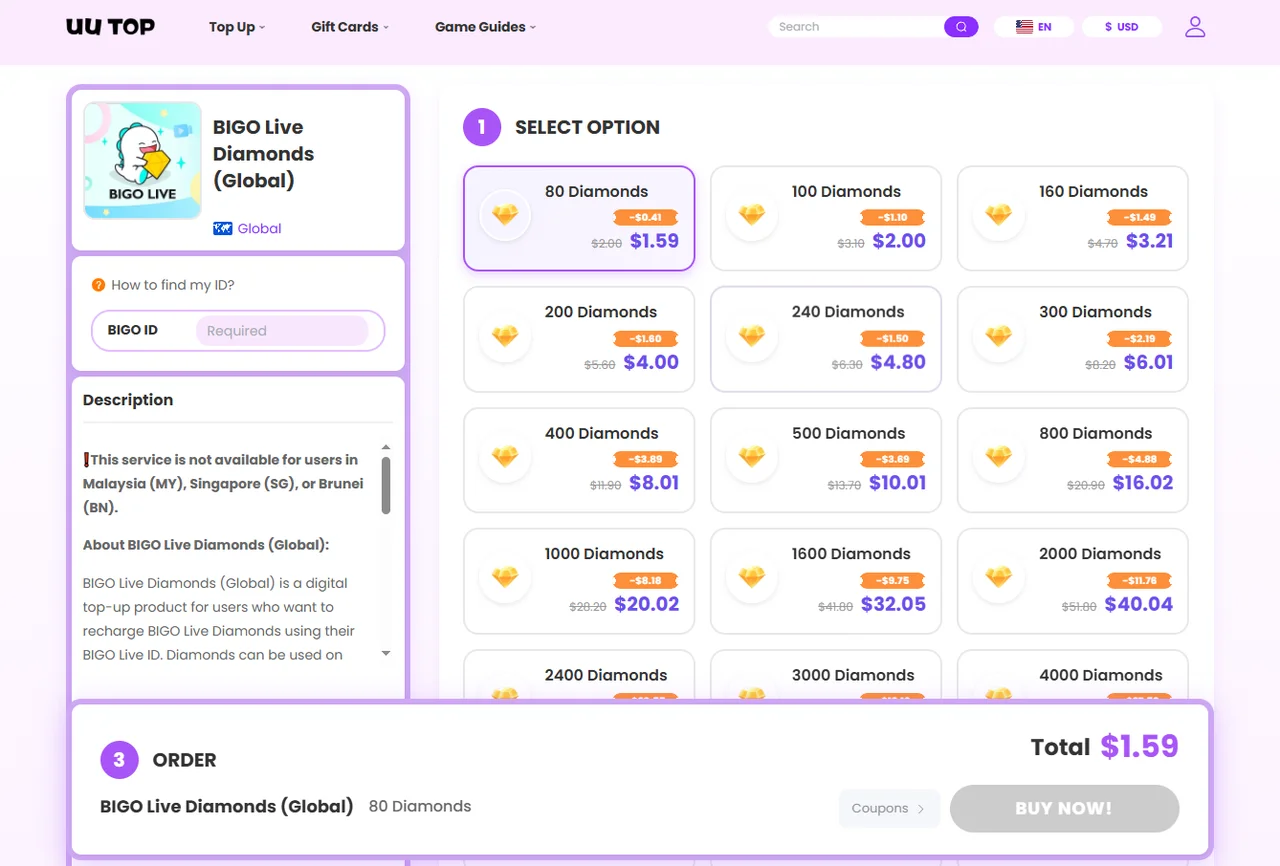
The UUTOP process is completed through the BIGO Live Diamonds product page:
- Open the UUTOP product page.
- Check the regional restriction notice.
- Select the required Diamond amount.
- Enter the receiving account’s BIGO ID.
- Review the package, quantity and ID.
- Choose one of the payment methods currently displayed at checkout.
- Complete the payment.
- Keep the order number until the Diamonds have arrived.
- Open BIGO Live and check the Wallet balance.
- UUTOP states that processing time may vary according to system status and order verification. Do not assume that every order will arrive within the same fixed period.
Important Checks Before You Pay
A short check can prevent most BIGO Live recharge problems:
- Confirm the BIGO ID character by character.
- Make sure the account region is supported.
- Verify the selected Diamond amount and quantity.
- Review the final currency and checkout total.
- Never provide a password or verification code.
- Save the payment receipt and order number.
- Avoid submitting a second payment while the first is processing.
- UUTOP notes that delivered digital goods are non-refundable. An order sent to an incorrect BIGO ID may also be unrecoverable, so ID verification is more important than completing the checkout quickly.
BIGO Live Recharge Problems and Solutions
Payment Succeeded but Diamonds Did Not Arrive
First, confirm that the payment was completed rather than marked as pending or declined. Then check the submitted BIGO ID and refresh the Wallet by restarting the app.
Do not immediately place the same order again. This could create a duplicate purchase while the first transaction is still being reviewed.
For an in-app or BIGOPay recharge, BIGO recommends contacting support if a successful purchase has not appeared after 30 minutes. Open Me > Help & Feedback and prepare:
- The receiving BIGO ID
- Purchase amount and currency
- Transaction date, time and time zone
- Recharge channel
- Order or transaction number
- Payment receipt
- Screenshot of the balance or error
- These requirements are listed in the official BIGO Live Support Center.
- For a UUTOP order, check its order status and contact UUTOP support with the order number, BIGO ID and relevant screenshots.
The Wrong BIGO ID Was Entered
Contact the recharge provider immediately. If processing has not started, support may be able to review the order.
Once Diamonds have been delivered, cancellation, transfer or refund may not be available. Do not ask the recipient for login access in an attempt to recover the purchase.
The Payment Method Is Declined or Missing
Payment methods can vary by country, account region, payment currency and platform. Check that:
- The payment details are correct.
- The account has enough funds.
- Online or international transactions are permitted.
- The selected provider supports your region.
- Your VPN is disabled and your region information is accurate.
- If the payment failed, confirm that no money was charged before trying again.
FAQ
Do I need to provide my BIGO Live password?
No. A direct BIGO ID top-up only requires the correct BIGO ID. Never provide your password or verification code.
Can I recharge BIGO Live Diamonds for another person?
Yes, if the recharge route accepts direct BIGO ID delivery. Ask the recipient for their correct ID, confirm the package and obtain their permission before paying.
What happens if I enter the wrong BIGO ID?
Contact the provider immediately. If the Diamonds have already been delivered, the transaction may not be recoverable or refundable


 EN
EN
 BIGO Live Diamonds (Global)