TOP UP NIKKE ON UUTOP
- 100% Authentic — Sourced from trusted global publishers.
- Instant Delivery — Automated delivery in seconds.
- 24/7 Support — Multilingual help anytime.

 EN
EN
To top up GODDESS OF VICTORY: NIKKE, you need the receiving account’s numeric Player ID, its actual server, and the product you want to purchase.
UUTOP uses a direct account top-up method, which does not require your NIKKE password, email login information, social account credentials, or verification codes.
Prepare the following information before opening the top-up page:
| Required information | Where to find it | Why it matters |
| Numeric NIKKE ID | Commander profile | Identifies the receiving account |
| Account server | Login or server-selection screen | Routes the purchase to the correct game data |
| Intended product | UUTOP product list | Determines whether you receive Gems, a pass or another listed item |
| Final order total | Checkout page | Shows the amount charged for the selected order |
Do not use the Commander nickname in place of the numeric ID. Nicknames are display names and may not uniquely identify the receiving account.
You should also decide what the account actually needs before purchasing. A direct Gem pack, Monthly Pass and progression resource set serve different purposes and should not be treated as interchangeable products.
Follow these steps inside NIKKE:
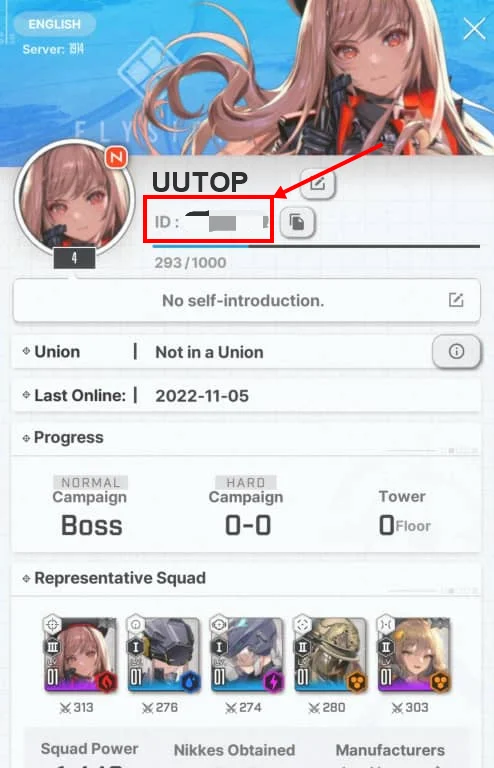
The Player ID is the numeric account identifier used for direct top-up. The Commander nickname is the visible name chosen by the player.
For example:
| Account detail | Suitable for top-up? |
| Numeric Player ID | Yes |
| Commander nickname | No |
| Email address | No |
| Social login name | No |
| Game password | Not required |
If the top-up form asks for an ID, enter the copied numeric value rather than the nickname shown elsewhere on the profile.
The international version of NIKKE mainly uses the following servers:
| Server | Meaning |
| NA | North America |
| Global | Global |
| SEA | Southeast Asia |
| JP | Japan |
| KR | Korea |
Game progress is separate between servers. The same login account can contain different Commander data depending on the selected server, so an incorrect selection can send the product to the wrong game environment.
You can confirm the server on the login or server-selection screen before entering the game.
Once the ID and server are confirmed:
Choose a direct Gem pack when you need a defined Gem amount for recruitment or another eligible in-game purchase.
Before ordering, calculate the remaining amount rather than buying based only on the total cost of your target. Subtract your current Free Gems, Paid Gems and available vouchers where applicable.
If you are preparing for a banner, confirm whether it accepts both Free and Paid Gems. Some paid or special purchase options may apply different currency conditions.
A Monthly Pass is intended for players who can use its benefits over the stated validity period. It should not be treated as an instant replacement for a direct Gem pack.
Before purchasing, check:
The correct delivery location depends on the product.
| Purchased product | Where to check first |
| Direct Gem pack | Gem balance after reopening the game |
| Monthly Pass | Pass status, shop screen and related claim area |
| Resource set | Inventory, in-game mail or the relevant progression screen |
| Other listed package | Location stated in the product description |
If the game was already open during delivery, close and reopen it to refresh the account information.
Do not assume an order failed simply because the Gem balance did not change. A pass or resource set may appear elsewhere.
The nickname is not the numeric account ID. Copy the ID from the profile instead of typing the visible Commander name.
Your physical country does not determine the account server. Select the server where the receiving character exists.
Gem packs, Monthly Passes and resource sets provide different benefits. Check the product name, quantity and contents before payment.
Bonus eligibility depends on the receiving account and package. A new payment method or merchant account does not automatically create another first-purchase reward.
If an order is still processing, check its status before placing another identical order. Multiple purchases can result in receiving more products than intended.
UUTOP’s NIKKE product uses ID-and-server direct top-up. It does not deliver a separate code for manual redemption.
If the order status shows completed but the product is not visible:
TOP UP NIKKE ON UUTOP
Open the Commander profile from the upper-left corner of the lobby. Copy the numeric ID displayed near the character name.
No. Direct top-up requires the receiving account’s numeric ID and server. A game password, email password, login code or verification code is not required.
Yes. Enter your friend’s correct numeric ID and select the server where their character exists. Verify both details before paying.
Processing time can vary. Check the live order status instead of relying on a fixed delivery estimate. Once the order is completed, reopen the game and check the appropriate product location.
