
Hiya
This product only supports top-ups for users in the Middle East and North Africa (MENA) region!
SELECT OPTION





Description
How to Top Up
- Choose a denomination
- Enter your game ID
- Pay securely
- Wait for credits to arrive
About Hiya Coins
Hiya is a social entertainment app featuring group voice-chat rooms, interactive games and virtual gifts. Users can join or create chat rooms, meet new people and interact with hosts and friends.
Hiya Coins are delivered directly to the account linked to the submitted Hiya User ID. After the order is processed, the selected Coins package will be added to that account.
This is not a redemption-code product. No manual redemption or activation is required.
What Can Hiya Coins Be Used For?
Hiya Coins are the virtual currency used for supported paid features within the Hiya app.
Coins may be used to:
- Purchase and send virtual gifts
- Support and interact with hosts or other users
- Participate in eligible in-app activities
- Access other Coin-based items or features displayed in the app
Available gifts, activities, items and prices may vary according to the account region, app version, account status and Hiya’s current rules.
How to Top Up Hiya Coins
- Select the required Hiya Coins package.
- Enter the receiving account’s numeric Hiya User ID.
- Check the User ID, package and quantity.
- Complete the payment and wait for the order to be processed.
- Reopen Hiya and check the Coins balance.
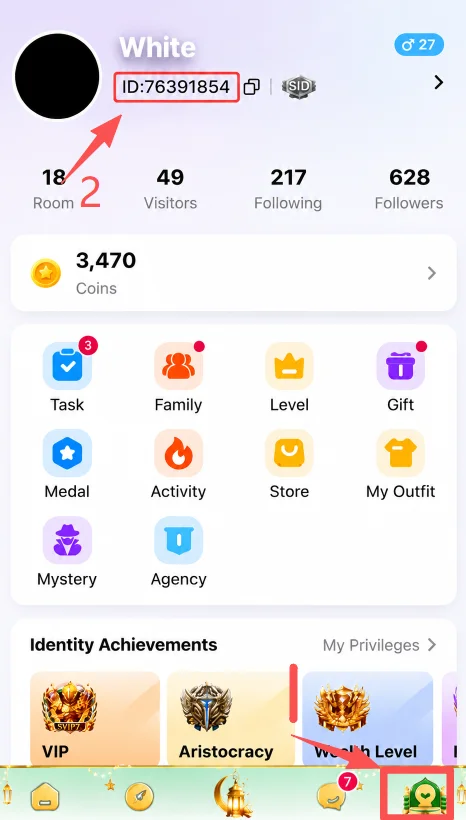
How to Find Your Hiya User ID
- Open Hiya and log in to the receiving account.
- Tap the Profile icon in the bottom-right corner.
- Find the numeric User ID displayed on the profile page.
- Copy the complete User ID and check it before payment.
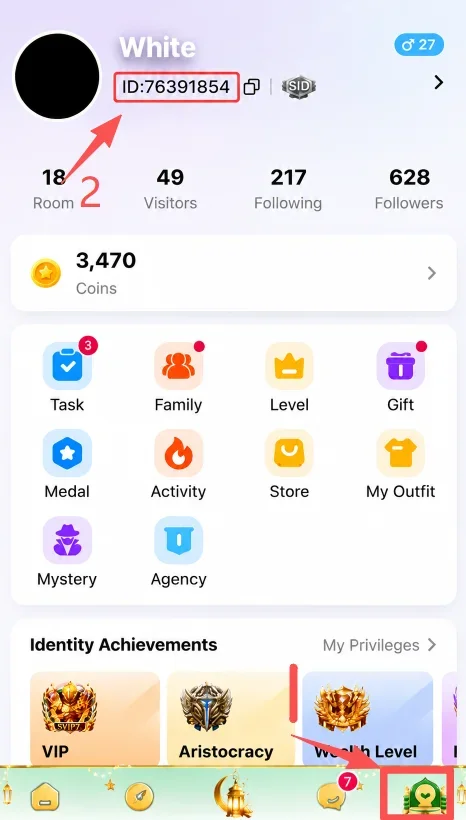
Do not enter a nickname, phone number, email address, room ID or social account information instead of the Hiya User ID.
Why Top Up Hiya Coins on UUTOP?
- Direct Account Top-Up: Coins are credited to the account connected to the submitted User ID.
- No Password Required: A Hiya password or login verification code is not required.
- Multiple Package Options: Select the Coins amount that matches your intended use.
- Simple Order Process: Enter the User ID, check the order and complete payment.
- Order Support: Contact UUTOP Support if an order remains processing or the Coins do not appear.
Check Before Top-Up
- The selected Coins package and quantity are correct
- The complete Hiya User ID has been entered correctly
- The User ID belongs to the intended receiving account
- The account supports the selected product and region
- The final order amount is correct
Coins delivered to an incorrect User ID may not be transferable or refundable.
Security Reminder
UUTOP only requires the information displayed on the order page. You do not need to provide your:
- Hiya password
- SMS or email verification code
- OTP
- Facebook, Google or other social login credentials
Never share passwords or verification codes with anyone.
Frequently Asked Questions
Q1: Is this a redemption-code product?
No. Hiya Coins are delivered directly to the account linked to the submitted User ID.
Q2: What information is required for a Hiya Coins top-up?
You normally need the receiving account’s numeric Hiya User ID and the Coins package you want to purchase.
Q3: Can I top up another person’s Hiya account?
Yes. Obtain the account holder’s permission and verify their User ID before paying.
Q4: How can I confirm that the Coins have arrived?
Log in to the receiving Hiya account and check its Coins balance. Reopen the app if the balance has not refreshed.
Q5: What should I do if the Coins do not appear?
Confirm the logged-in account and submitted User ID. If the order is complete but the Coins are still missing, contact UUTOP Support with the order number, User ID, selected package and relevant screenshots.