

Likee Diamonds
 GLOBAL
You can top up diamonds💎 for this product simply by entering your Likee ID—no login required. It’s safe, secure, and fast.
SELECT OPTION







Description
How to Top Up
- Select the number of diamonds you wish to purchase.
- Enter your correct Likee User ID.
- Verify your User ID and the top-up amount, then complete the payment.
- Once the top-up is complete, log in to your Likee account to view your diamond balance.
What Are Likee Diamonds?
Diamonds are Likee’s paid virtual currency. They can be used for supported activities such as:
- Sending virtual gifts during live streams
- Supporting creators and hosts
- Participating in selected live events
- Accessing other Diamond-based features shown in the app
Available gifts, features and Diamond prices may vary according to the account region and current Likee rules.
How to Find Your Likee ID
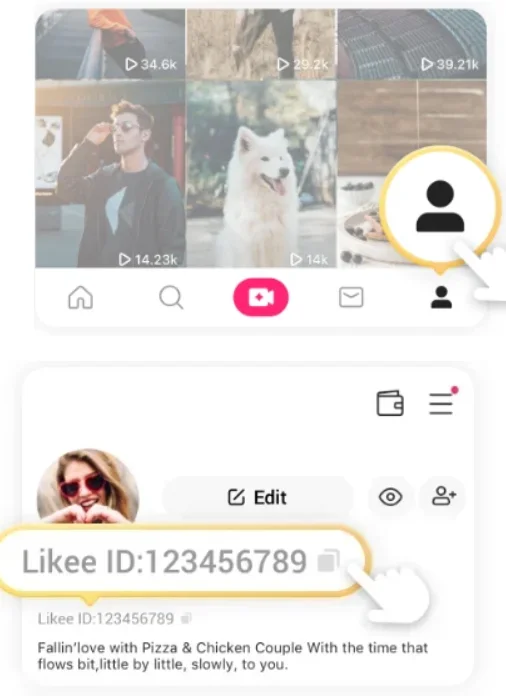
Your Likee ID is displayed on your profile page.
- Open Likee.
- Tap your profile picture.
3. Open View or Edit Profile.
4. Locate the Likee ID shown below your profile information.
5. Copy the complete ID.
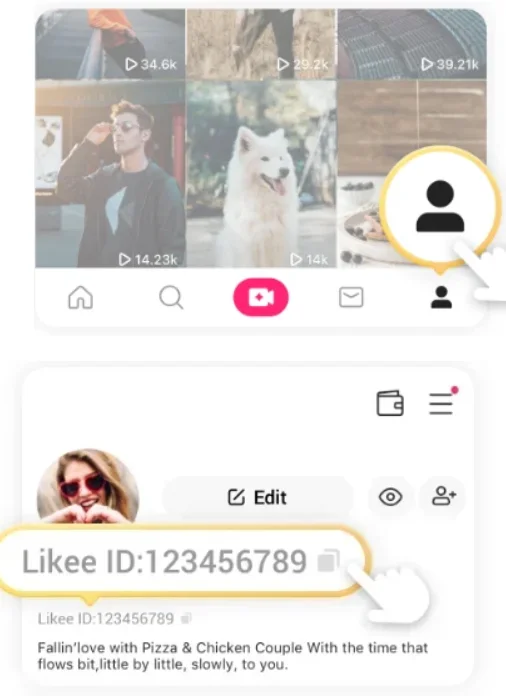
Do not enter a nickname, email address or phone number in place of the Likee ID. If you are topping up another person’s account, ask them to copy the ID directly from their profile.
Is It Safe to Top Up Likee Diamonds on UUTOP?
Topping up Likee Diamonds on UUTOP can be a secure option when you use the official UUTOP website and verify the order details before paying.
A Likee ID top-up does not require your account password, OTP or verification code. You only need to provide the correct Likee ID and select a Diamond package.Before payment, check:
- The Likee ID matches your profile
- The selected Diamond package and quantity are correct
- The final checkout amount is correct
- No one asks for your Likee password or verification code
Keep the order number and payment receipt until the Diamonds appear in your Likee Wallet.
Why Choose UUTOP for a Likee Diamonds Top-Up?
UUTOP provides a straightforward Likee recharge process based on the receiving account’s Likee ID.
- No account login required: Complete the top-up without sharing your Likee password.
- Direct account delivery: Diamonds are credited to the account connected to the submitted Likee ID.
- Multiple package options: Choose the Diamond amount that matches your gifting or live-streaming needs.
- Simple checkout: Review the Likee ID, package, quantity and final amount before payment.
- Available payment options: Select from the methods currently displayed at checkout.
- Order support: Keep your order number and contact UUTOP Support if the recharge remains processing or the Diamonds do not appear.
Before ordering, confirm that the selected Likee product supports your account region. Then enter the Likee ID carefully and check every detail before completing the payment.
Frequently Asked Questions
Q1:Can I top up Likee Diamonds for another person?
Yes. Enter the recipient’s correct Likee ID and confirm the account before paying.
Q2:Where can I check the Diamonds after recharging?
Open Likee and go to Me > Wallet > Diamonds. Restart the app if the balance has not refreshed.
Q3:What happens if I enter the wrong Likee ID?
Contact the recharge provider immediately. Once the Diamonds have been delivered, the transaction may not be transferable or refundable.