








Steam Wallet Code (PHP)
❗Important Note: The code is redeemable according to your Steam Wallet Region / Currency Setting. Please be aware that all purchases are NON-REFUNDABLE and NON-RETURNABLE.
SELECT OPTION


Description
How to Buy a Gift Card
- Choose a denomination
- Pay securely
- Get your code
- Redeem on the official site
About Steam Wallet Code
Steam Wallet Code is a prepaid code that allows you to add funds to your Steam Wallet. You can choose the appropriate Steam Wallet Code based on your Steam account region, wallet currency, and the product's redemption requirements.
Once redeemed, the corresponding amount will be added to your Steam Wallet Balance. You can use it to purchase games, DLC, in-game items, and other digital content available on Steam.
Important Notice:
Before purchasing, please check the currency and regional restrictions of your selected Steam Wallet Code, as well as your Steam account details. Some codes may have regional or currency restrictions. Cross-currency redemption and currency conversion are subject to Steam's official policies and the information displayed during redemption.
How to Redeem Steam Wallet Code?
Follow these steps to redeem your Steam Wallet Code:
- Log in to your Steam account.
- Visit the official Steam Wallet Code redemption page.
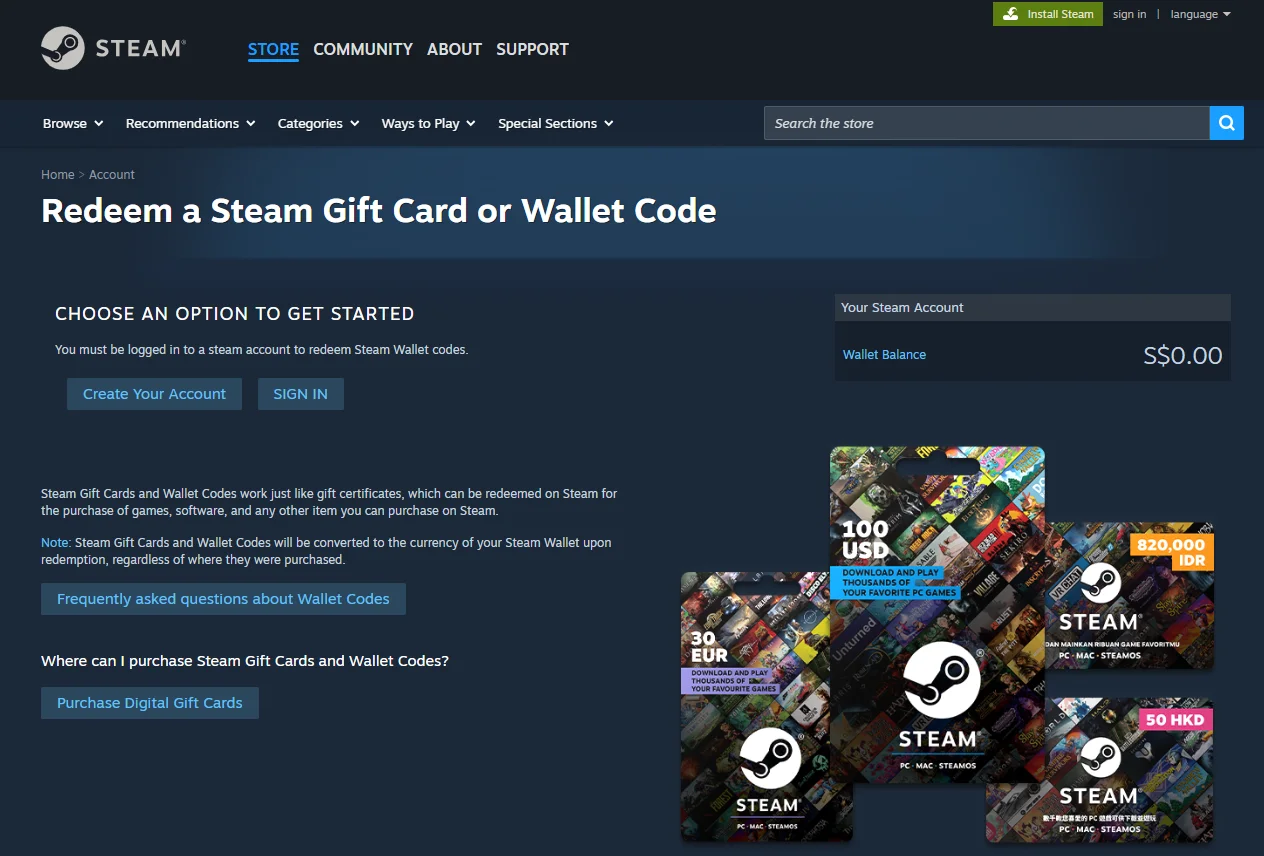
- Click "Redeem a Steam Gift Card or Wallet Code".
- Enter your Steam Wallet Code and click Continue.
- Once redeemed, the funds will be added to your Steam Wallet and can be used to purchase games and other eligible content.
What Can You Buy with Steam Wallet Balance?
Once your code is successfully redeemed, the funds will be added to your Steam Wallet Balance. You can use your balance to:
- Purchase digital games on Steam.
- Buy DLC, expansion packs, and additional content.
- Purchase in-game items and bundles that support Steam Wallet payments.
- Explore and buy indie games, popular titles, and classic games.
- Pay for other eligible digital products and services on Steam.
The availability of Steam Wallet payments may vary depending on the game, content, region, and account status. Please refer to the Steam Store and your account information for details.
Steam Wallet Region and Currency Information
Steam Wallet Codes are available in different currencies and denominations. Redemption requirements may vary depending on the product type, issuing region, and Steam's policies.
Some codes may support currency conversion during redemption, but this does not mean every code can be redeemed in any region. The final wallet balance and currency conversion are subject to the information displayed by Steam.
Before purchasing, please check the following:
- The currency and supported regions of your selected Steam Wallet Code.
- Your Steam account region and wallet currency settings.
- Make sure you are logged in to the correct Steam account.
- Confirm that your code meets the redemption requirements.
- Redeem your code only through official Steam channels.
- Make sure your intended purchases support Steam Wallet payments.
- Never share your Steam Wallet Code with strangers or unknown third parties.
Security Notice
Do not use Steam Wallet Codes to pay for online shopping, bills, third-party game items, or payment requests from strangers outside the official Steam platform.
UUTOP is not affiliated with scams, unauthorized trading platforms, or third-party resale requests. Always redeem your Steam Wallet Code through official Steam channels to protect your account and wallet balance.
Never enter your Steam Wallet Code on unofficial Steam websites, fake customer support pages, suspicious links, trading platforms, or third-party payment pages.
UUTOP does not require your Steam password, OTP, verification codes, or login information.
FAQ
Q1: What is a Steam Wallet Code?
A: A Steam Wallet Code is a prepaid code that adds funds to your Steam Wallet, allowing you to purchase eligible games and digital content on Steam.
Q2: Can Steam Wallet Codes be used in all regions?
A: Not necessarily. Some codes may have regional or redemption restrictions. Before purchasing, check the supported regions, currency, and your Steam account settings.
Q3: Can I redeem a Steam Wallet Code in a different currency?
A: Steam supports currency conversion for certain Wallet Code redemptions. When supported, the redeemed amount may be converted into your Steam Wallet currency according to Steam's policies. Eligibility and the final credited amount depend on Steam's official redemption process.
Q4: What can I buy with my Steam Wallet Balance?
A: You can use your Steam Wallet Balance to purchase eligible Steam games, DLC, in-game content, and other digital products on the platform.
Q5: Do I need to provide my Steam account password?
A: No. UUTOP does not require your Steam password, OTP, verification codes, or login information. You can redeem the code yourself through the official Steam platform.
Q6: What should I do if my Steam Wallet Code doesn't work?
A: First, check that you have entered the code correctly and verify its regional restrictions and redemption requirements. If the issue persists, save the error message displayed by Steam and contact UUTOP customer support for assistance.
Q7: What happens if I redeem the code on the wrong account?
A: Once redeemed, the funds are generally added to the Steam account currently logged in. Make sure you are using the correct account before redeeming your code.
Q8: Can I get a refund after redeeming the code?
A: Successfully redeemed Steam Wallet Codes are generally non-refundable. Refund requests for unused or delivered digital products are subject to UUTOP's refund policy and applicable regulations. Please verify the code's currency, supported regions, and product details before purchasing.