

SUGO
 GLOBAL
You can top up coins for this product simply by entering your SUGO ID. No login required—it’s safe and fast.
SELECT OPTION









Description
How to Top Up
- Select the denomination you wish to top up
- Enter your SUGO User ID.
- Choose a payment method and complete the payment
- Wait for the funds to be credited to your account
1. About the Product
SUGO is a voice-chat and social interaction app. Users can join group voice rooms and party rooms, chat with other users, share moments, and send supported virtual gifts.
SUGO Coins are an ID-based direct top-up product. Enter the correct SUGO User ID when placing your order. After the order is processed successfully, the selected number of Coins will be credited directly to the SUGO account linked to that User ID.
This is not a redeem code product. No code will be issued, and you do not need to redeem or activate the Coins manually.
2. What Can SUGO Coins Be Used For?
SUGO Coins are the virtual currency used for supported paid features in the SUGO app.
Coins can be used to:
- Purchase and send supported virtual gifts
- Support hosts, creators, or other users through gifting
- Access other Coin-based features, activities, or digital content displayed in the app
Available gifts, features, prices, and usage conditions may vary depending on the account region, app version, account status, event availability, and SUGO platform rules.
3. How to Top Up SUGO Coins
- Select the SUGO Coins package you want to purchase.
- Enter the SUGO User ID that should receive the Coins.
- Confirm the User ID, Coins package, quantity, and order details.
- Complete the payment and wait for the order to be processed.
- Open SUGO and check whether the Coins balance has been updated.
4. How to Find Your SUGO User ID
- Open SUGO and log in to the account you want to top up.
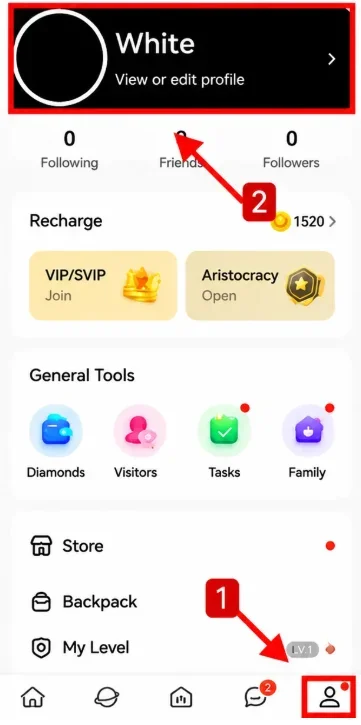
- Tap ME in the bottom-right corner.
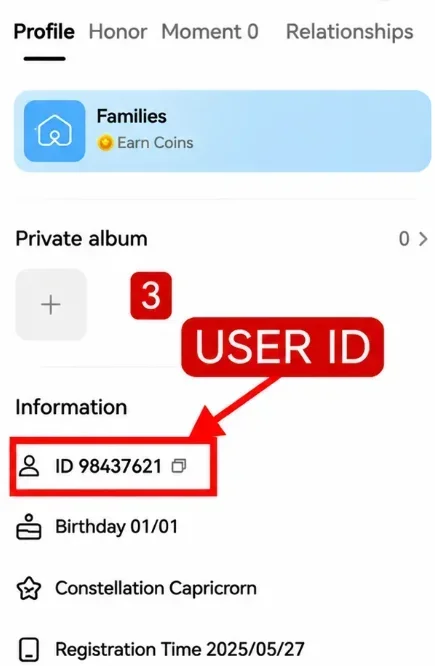
- Open View/Edit Profile or Personal Information.
- Find and copy the displayed User ID.
- Confirm that the User ID belongs to the correct receiving account.
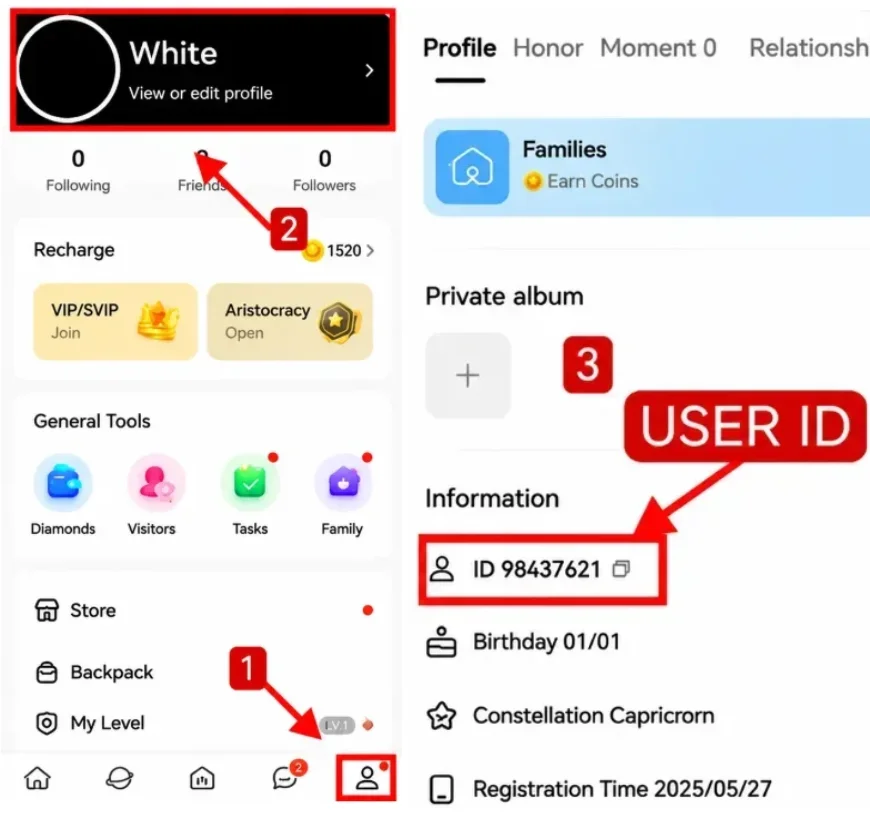
Do not use your nickname, phone number, email address, or invitation code instead of the User ID. Menu names may vary slightly depending on the app version.
5. Check Before Top-Up
- You have selected the correct SUGO Coins package.
- The User ID is complete and correct.
- The User ID belongs to the intended receiving account.
- The account and region support the selected product.
- The quantity, product information, and order amount are correct.
If the User ID is incorrect, the Coins may be credited to another account. Once an order enters processing or the Coins have been delivered, the receiving account usually cannot be changed, and the Coins may not be transferable or refundable.
6. Security Reminder
UUTOP only requires the SUGO User ID requested on the order page. You do not need to provide:
- Your SUGO account password
- SMS or email verification codes
- OTP or one-time passwords
- Social account login details
- Full account login information
Never share your password or verification codes with anyone.
FAQ
Q1: Is this a redeem code product?
No. This is a direct SUGO account top-up service. No redeem code will be provided.
Q2: What information is required?
You only need to enter the SUGO User ID requested on the order page. No account password or verification code is required.
Q3: Can I top up another person’s account?
Yes. Obtain permission from the account owner and confirm the correct User ID and Coins package before ordering.
Q4: How can I confirm that the Coins have arrived?
Log in to the receiving SUGO account and check whether the Coins balance has been updated.
Q5: The order shows “Completed,” but the Coins have not arrived. What should I do?
Reopen SUGO and confirm that you are logged in to the correct account. If the balance is still unchanged, contact UUTOP Customer Support and provide the order number, User ID, purchased package, and relevant screenshots.