


Whiteout Survival Frost Star
 GLOBAL
विकल्प चुनें






विवरण
टॉप-अप कैसे करें
- Select Product: Choose your desired Frost Star denomination.
- Enter Your Information: Enter your correct Whiteout Survival Player ID.
- Complete Payment: Verify your top-up details and complete the payment.
- Receive Frost Stars: Once processed, check your Frost Star balance in the game.
About Whiteout Survival
Whiteout Survival is a survival strategy game set in a frozen, post-apocalyptic world. As global temperatures plummet, human civilization faces devastating destruction, and survivors must fight to stay alive against blizzards, wild beasts, and harsh environmental conditions.
Players take on the role of a city leader in a frozen wasteland, guiding survivors to rebuild civilization. By gathering resources, upgrading the Furnace, developing the city, recruiting and training heroes, and joining alliances in cross-state battles, players can expand their cities and survive in the harsh frozen world.
About Frost Star
Frost Star is the premium paid currency in Whiteout Survival. It serves as an in-game payment currency and can be used to purchase various bundles, Gems, and other paid items from the in-game shop.
Purchased Frost Stars are credited to your game account balance, allowing you to choose and purchase items according to your needs and game progress.
The main uses of Frost Star include:
- Unlocking Features: Purchase permanent features such as additional Construction Queues and March Queues to improve city development and troop deployment efficiency.
- Hero Recruitment & Development: Purchase Hero Shards, recruitment bundles, and related upgrade materials.
- Equipment & Stat Enhancement: Purchase Chief Gear, Charm materials, and other progression resources.
- Daily Resource Supplies: Purchase Monthly Cards, Weekly Cards, Growth Funds, and speed-up items.
- Limited-Time Event Bundles: Participate in limited-time events and purchase special bundles containing Gems, Hero Shards, and rare materials.
After your top-up is completed, your Frost Stars will remain in your game account balance. You can visit the in-game Shop or event pages, select items that support Frost Star payments, and complete your purchases using your available balance.
How to Find Your Whiteout Survival Player ID?
- Open Whiteout Survival and enter the main screen.
- Tap your Chief Avatar in the upper-left corner.
- Open your profile and find your Player ID below your Chief name.
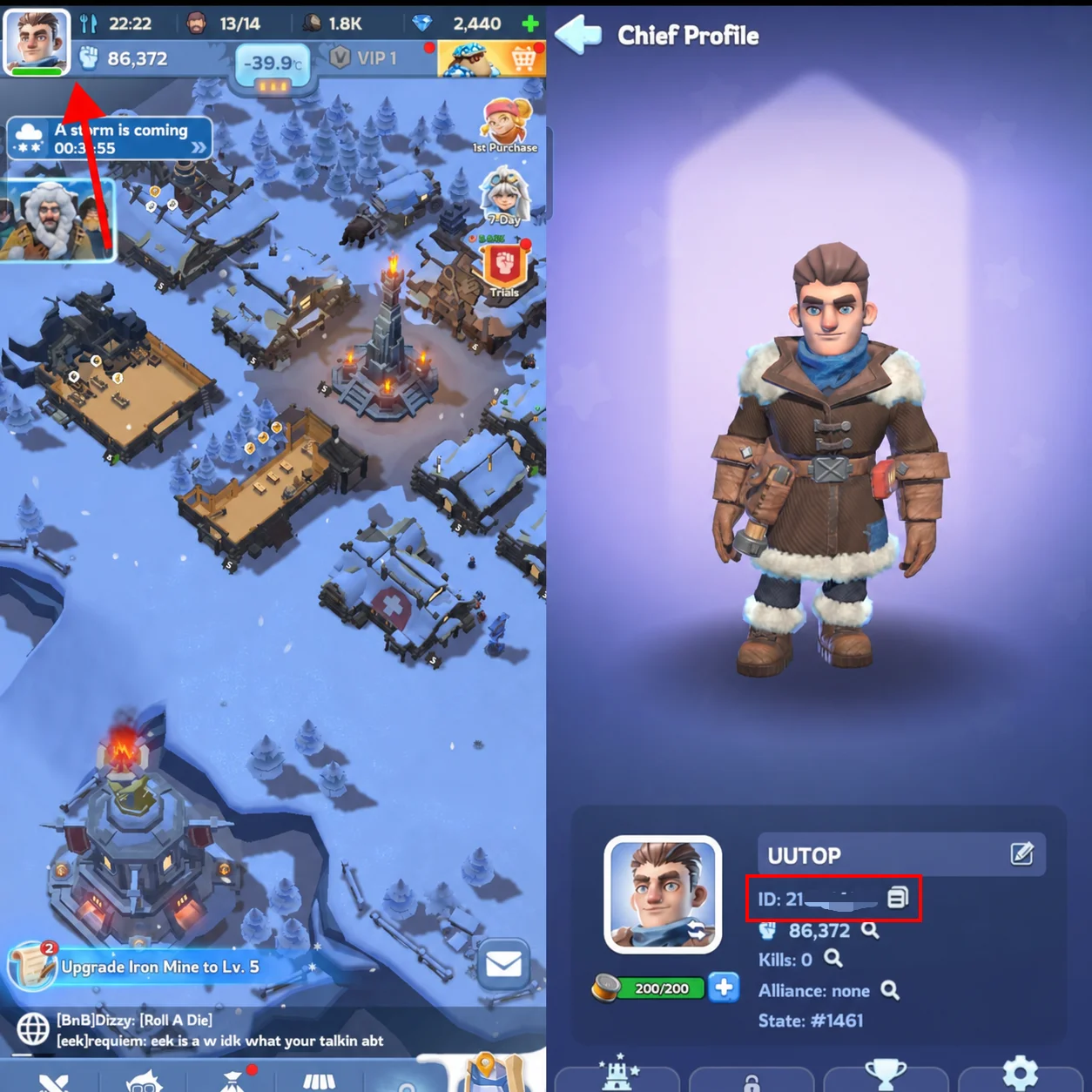
- Copy your full Player ID and enter it on the UUTOP top-up page.
Note: Please use the Player ID displayed on your in-game profile, not your Chief name. Double-check your ID before placing an order to avoid topping up the wrong account.
Frequently Asked Questions (FAQ)
Q1: What is the difference between Frost Star and Gems?
Frost Star is a premium paid currency mainly used to purchase bundles and items from the in-game shop. Gems are a separate in-game resource used for specific purchases. Frost Star can be used to purchase certain bundles or items that contain Gems, but the two are not the same currency.
Q2: How can I use my purchased Frost Stars?
Once your Frost Stars have been credited, visit the in-game Shop, Deals, or event pages and select the bundle or item you want. Choose Frost Star as your payment method at checkout. The corresponding amount will be deducted from your account balance, and the purchased rewards will be delivered to your game account.
Q3: Are there purchase limits for Frost Stars or in-game bundles?
Some Frost Star denominations and in-game bundles may have weekly purchase limits. Restrictions vary depending on the product and game rules. Please refer to the current product page and in-game notifications for the latest details.
Q4: What should I do if my Frost Stars have not arrived after a successful payment?
First, make sure your Player ID is correct. Then, restart the game and check your account balance and in-game mail. If the Frost Stars are still missing, contact UUTOP Customer Support with your order number and Player ID so our team can investigate.