


D
nice and quick

 KO

 GLOBAL

1. About the Product
Kumu is a livestreaming and social community platform where users can watch livestreams, interact with streamers and creators, join supported community activities, and send virtual gifts.
Kumu Live Coins is a direct account top-up product. To place an order, enter the correct Kumu Username. Once the order has been processed successfully, the selected number of Coins will be credited directly to the Kumu account linked to that username.
This product does not include a redeem code. No manual redemption or activation is required after purchase.
2. What Kumu Live Coins Can Be Used For
Kumu Live Coins are the virtual currency used for supported paid features in the Kumu app.
Coins can be used to:
Available gifts, activities, prices, and usage conditions may vary depending on the account region, app version, account status, event availability, and Kumu platform rules.
Check the latest information displayed in the Kumu app before purchasing.
3. How to Top Up Kumu Live Coins
4. How to Find Your Kumu Username
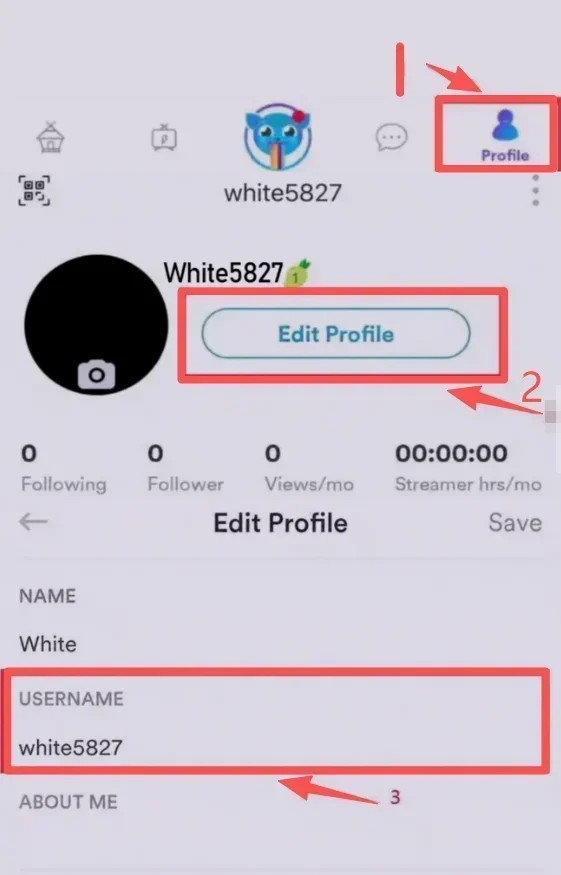
Do not enter a display name, phone number, email address, streamer name, or livestream room name instead of the Kumu Username. Menu locations may differ between app versions.
5. Check Before Topping Up
Before placing your order, make sure that:
If the username is incorrect, the Coins may be credited to another account. Once an order is being processed or has been completed, the receiving account usually cannot be changed, and the Coins generally cannot be withdrawn, transferred, or refunded.
6. Security Notice
UUTOP only requires the Kumu Username requested on the order page. You do not need to provide your:
Never share your account password or verification codes with anyone.
FAQ
Q1: Is this a redeem code product?
No. This is a direct Kumu account top-up service. No redeem code will be provided.
Q2: What information is required for the top-up?
You only need to enter the Kumu Username requested on the order page. Your password and verification codes are not required.
Q3: Can I top up another person’s Kumu account?
Yes. Obtain permission from the account owner and confirm that the Kumu Username and Coins amount are correct before placing the order.
Q4: How can I confirm that the Coins have arrived?
Log in to the Kumu account associated with the username entered during checkout and check the Coins balance in the wallet.
Q5: What should I do if the order is completed but the Coins have not arrived?
Restart the Kumu app and confirm that you are logged in to the correct account. If the balance has still not been updated, contact UUTOP customer support and provide the order number, Kumu Username, purchased package, and relevant screenshots.
리뷰
4 Reviews
nice and quick
super fast
FAST AND STABLE
good overall experience