
Free Fire
SELECIONAR OPÇÃO




Descrição
Como recarregar
- Escolha o valor
- Digite o ID do jogo
- Pague com segurança
- Aguarde o crédito
About Free Fire Diamonds
Free Fire Diamonds are the game's premium currency. They can be used to purchase various items, cosmetics, and event products available in the in-game store.
Players can use Diamonds to purchase:
- Character Outfits & Cosmetics: Purchase exclusive outfits, character accessories, and other cosmetic items.
- Weapon Skins: Obtain different weapon appearances and related cosmetics.
- Crates & Draws: Participate in in-game draw events to obtain rare skins and other rewards.
- In-Game Bundles: Purchase selected bundles and items available in the store.
- Limited-Time Events: Use Diamonds to participate in eligible events and obtain exclusive rewards.
Available items, event rewards, and Diamond prices are subject to the information displayed in the in-game store and event pages.
Information Required for Free Fire Top-Ups
UUTOP provides UID top-up services. You only need to enter the game information required on the product page.
- Free Fire UID: Identifies the game account that will receive the Diamonds.
We recommend copying your complete UID directly from the game to avoid errors when entering the numbers manually.
Your game account password, login verification code, or other account login credentials are not required.
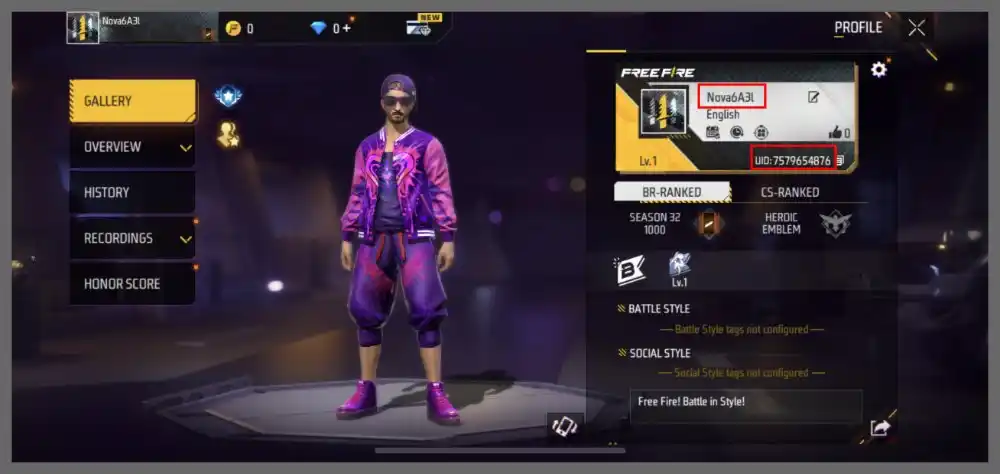
How to Find Your Free Fire UID?
Open Free Fire and enter the main screen.
Tap your profile picture in the upper-left corner to open your profile.
Find your Free Fire UID (Player ID) on the profile page.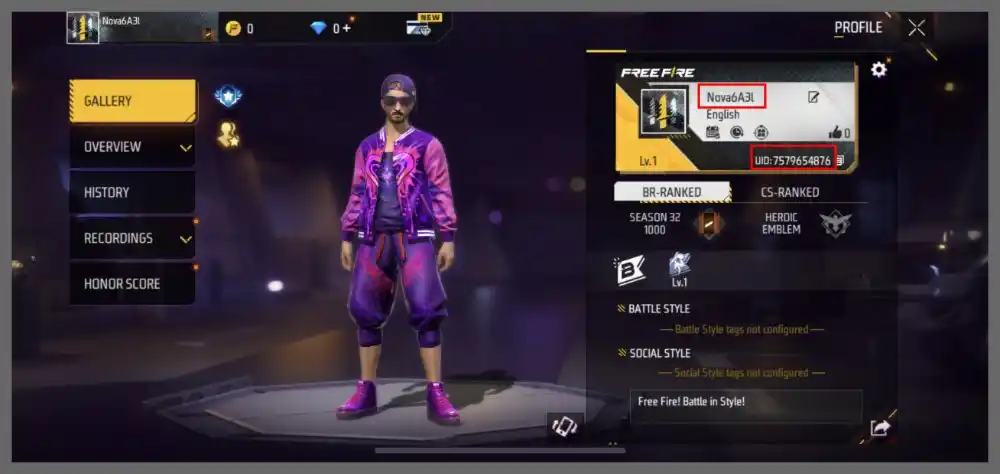
Copy the complete UID and enter it in the corresponding field on the UUTOP product page.
Before submitting your order, check the UID again to make sure it belongs to the game account you want to top up.
Free Fire Supported Regions
Free Fire top-up products are region-specific. Products intended for different regions are not automatically interchangeable.
UUTOP offers Free Fire top-up products for different regions. Before purchasing, make sure your game account's region matches the selected product version. Products for different regions have separate eligibility requirements, so do not select a product intended for another region.
If you are unsure which region your account belongs to, check your account information before selecting a product.
Why Choose UUTOP for Free Fire Top-Ups?
- Multiple Regional Options: Choose from different regional versions to find the Free Fire top-up product that matches your game account.
- UID Top-Up: Complete your purchase using your game UID without providing your game account password or login verification code to UUTOP.
- Multiple Product Options: Choose from the Diamond packages and other game-related products available on the product page.
- Convenient Order Tracking: Check your order processing status through the order center after payment.
- Customer Support: Contact UUTOP customer support for assistance with top-up delays, order issues, or missing Diamonds.
Important Notes for Free Fire Top-Ups
- Check the Region: Make sure the selected product version matches your game account's region. Products for different regions are not automatically interchangeable.
- Verify Your UID: Carefully check your UID before completing payment.
- Delivery Time: The estimated delivery time displayed on the UUTOP product page applies.
- Incorrect Information: If you enter an incorrect UID, contact UUTOP customer support immediately and provide your order number. Whether the information can be changed depends on the current order status.
- Top-Up Issues: If your Diamonds have not arrived after successful payment, check your order status and contact UUTOP customer support for assistance.
Free Fire Top-Up FAQ
1. Do I need to provide my game account password to top up Free Fire?
No. UUTOP provides UID top-up services. Simply enter your Free Fire UID as required on the product page. Your game account password, login verification code, or other account login credentials are not required.
2. Can Free Fire top-up products from different regions be used interchangeably?
Not by default. Free Fire top-up products are region-specific. Select the product version that matches your game account's region and carefully check the regional information on the product page before purchasing.
3. How long does it take for Free Fire Diamonds to arrive?
The estimated delivery time displayed on the UUTOP product page applies. You can check your order status through the order center after payment. If your Diamonds have not arrived after the estimated delivery time, contact UUTOP customer support.
4. What should I do if my Diamonds have not arrived after topping up?
First, confirm that your payment was successful and check your order status and submitted UID. If the order is marked as completed but your Diamonds have not arrived, provide your order number to UUTOP customer support for further assistance.