


PUBG Mobile UC Top Up Guide: How to Buy UC and Choose the Right Package

A PUBG Mobile UC top up adds Unknown Cash directly to your game account. UC can be used for the Royale Pass, outfits, weapon finishes, vehicle skins, emotes, crates, Lucky Draws, and other premium content.
Before recharging, decide what you want to buy, check its current UC cost, and select the smallest package that covers it. For a Player ID top up, you also need to confirm that the product supports your version of PUBG Mobile.
This guide explains how UC works, how to recharge it, and how to choose a package without buying more than you need.
What Is UC in PUBG Mobile?
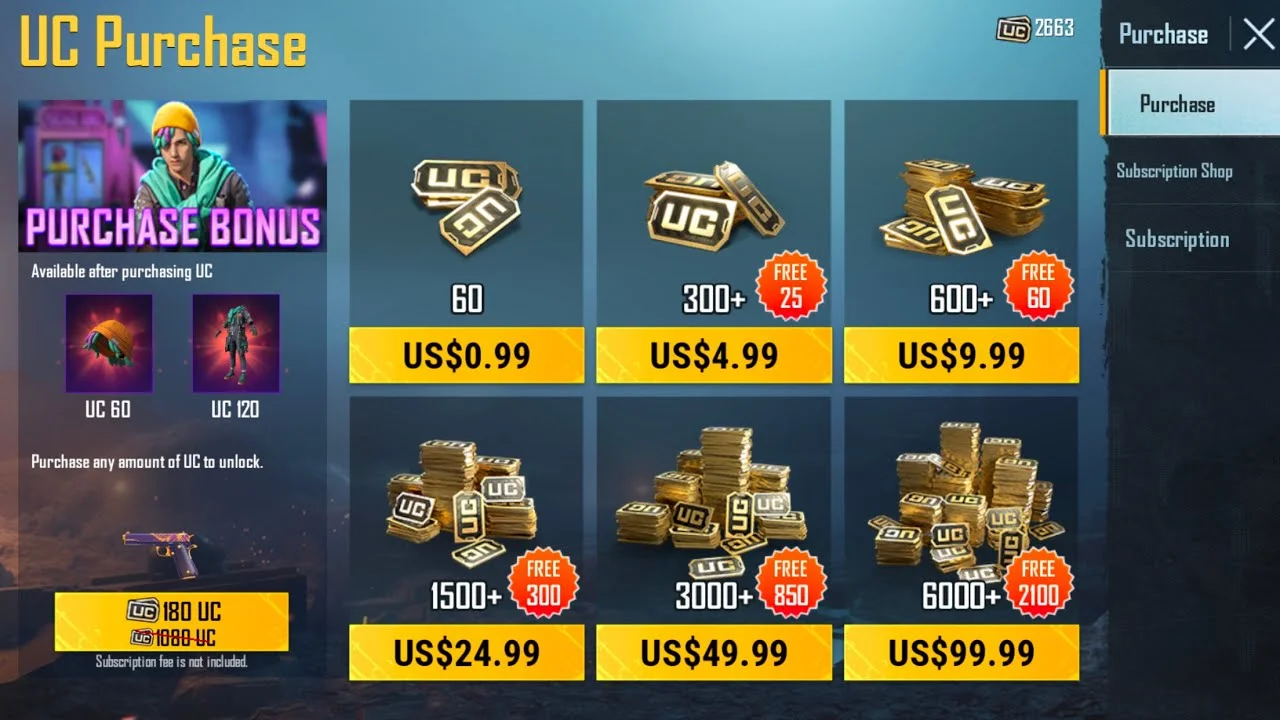
UC stands for Unknown Cash. It is PUBG Mobile’s premium currency and is mainly obtained through real-money purchases.
UC is different from currencies earned through regular gameplay. Those currencies may cover selected items or upgrades, while UC is used for premium passes, cosmetics, crates, draws, and event content.
Purchasing UC does not directly improve your combat statistics. Its value depends on what you want to unlock and how carefully you plan your spending.
What Can You Buy With PUBG Mobile UC?
PUBG Mobile regularly updates its store, events, and reward systems, but the main uses of UC remain consistent.
UC can be used for eligible outfits, character accessories, emotes, parachute designs, vehicle skins, and other cosmetic content.
Some items have a direct UC price, making their total cost easy to calculate. Others may be connected to limited events, crates, or draws with variable outcomes.
How to Find Your PUBG Mobile Player ID
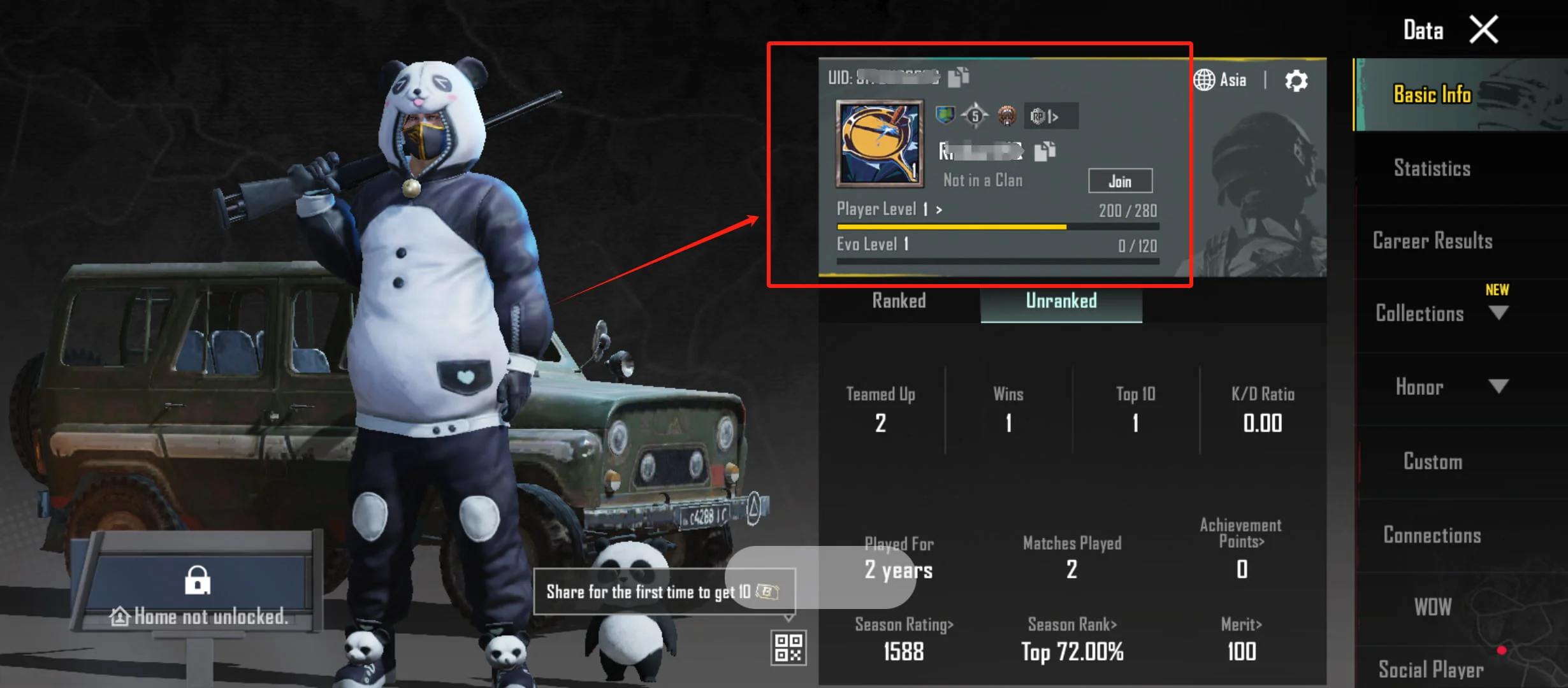
Your Player ID is the numeric identifier connected to your PUBG Mobile account. It is different from your nickname.
To find it:
- Open PUBG Mobile and enter the main lobby.
- Tap your profile picture.
- Open your profile information.
- Find the numeric Player ID.
- Copy it directly from the game.
Use the Player ID for the character that should receive the UC. If you are topping up for a friend, ask them to copy the number from their own profile instead of typing it from memory.
A Player ID top up follows the account information entered during checkout, so compare the first and last digits with the number shown in the game before paying.
Ways to Top Up PUBG Mobile
The two main options are purchasing UC through the in-game store or using a supported Player ID top-up service.
In-Game Store
The in-game store uses the payment system connected to your device. Depending on your platform and country, purchases may be processed through an app store, card, mobile wallet, or another displayed option.
To use this route:
- Open PUBG Mobile.
- Tap the UC icon or enter the purchase section.
- Select a UC package.
- Choose an available payment method.
- Complete payment and check your new balance.
UUTOP Player ID Top Up
The UUTOP PUBG Mobile UC Top Up provides direct UC recharge using a PUBG Mobile Player ID. No redemption code is required.
How to Top Up PUBG Mobile UC on UUTOP
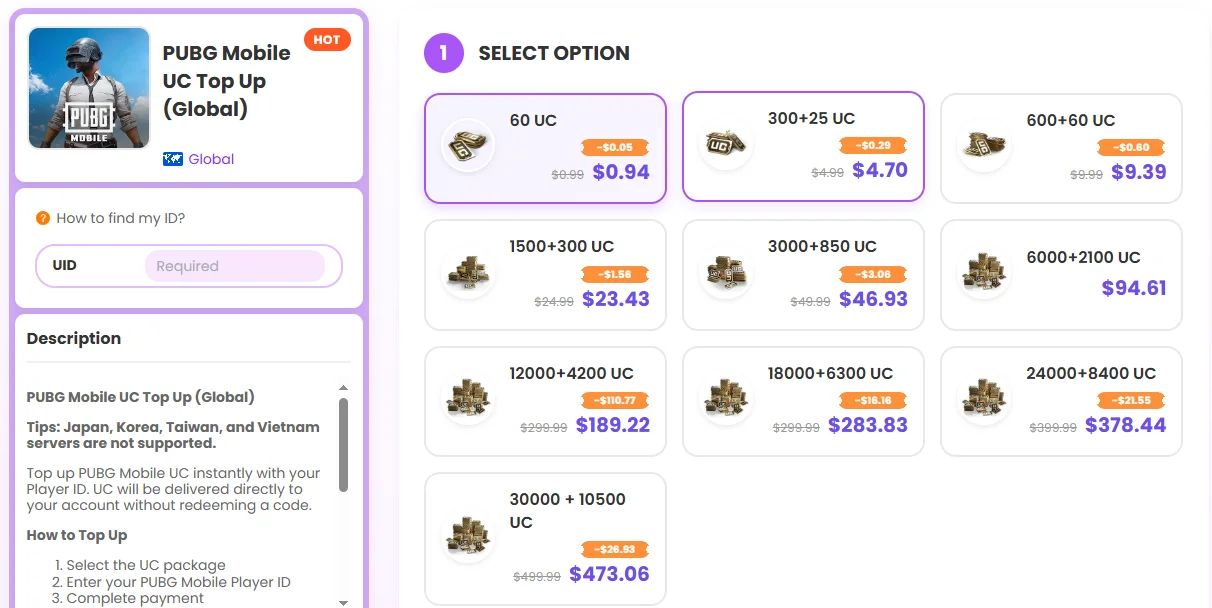
The UUTOP recharge process requires only a few steps:
- Open the UUTOP PUBG Mobile UC Top Up.
- Choose the UC package you want.
- Enter the receiving account’s Player ID.
- Review the package, quantity, Player ID, and final checkout amount.
- Select one of the payment methods displayed for the order.
- Complete payment.
- Check the UC balance or in-game mail after the order is processed.
The Global product uses direct delivery, so there is no PIN or redemption code to enter afterward. The UC is credited to the PUBG Mobile account connected to the submitted Player ID.
How to Choose the Right UC Package
Start with the item you want rather than the largest available package. Check the current in-game cost, subtract the UC already in your account, and purchase enough to cover the remaining amount.
For Royale Pass Buyers
Check the current Royale Pass price and your existing balance. Choose the smallest package that reaches the required amount after included bonus UC is counted.
The Royale Pass is most useful for players who expect to complete enough missions and ranks to collect its featured rewards.
For Cosmetic Collectors
For an outfit, emote, or directly priced skin, calculate the exact shortage before recharging. Buying a slightly larger package may make sense if you already have another planned purchase, but unused UC should not automatically be treated as savings.
For Crates and Lucky Draws
Decide your maximum number of attempts before starting. Multiply the cost per attempt by that limit and select a package that stays within your planned budget.
If an event offers discounted first draws, milestones, or guaranteed rewards, calculate those separately using the current rules displayed in the game.
PUBG TOP UP FAQ
Where can I find my PUBG Mobile Player ID?
Open your PUBG Mobile profile and copy the numeric Player ID displayed with your account information.
Does a UUTOP PUBG Mobile top up require my password?
No. The direct recharge uses your PUBG Mobile Player ID.
How long does a PUBG Mobile UC top up take?
Delivery depends on payment confirmation and order processing. Check the current order status rather than relying on a fixed delivery estimate.
Can I top up UC for a friend?
Yes. Use your friend’s Player ID and confirm that their account belongs to a region supported by the selected product.
Why is my PUBG Mobile region not supported?
Regional versions can use different products and payment systems. The UUTOP Global listing does not support Japan, Korea, Taiwan, or Vietnam servers.
How much UC do I need for the Royale Pass?
Open the current Royale Pass page in PUBG Mobile and check the displayed UC requirement, then subtract the UC already in your account.
