
Mobile Legends: Bang Bang (MY)
 Malaysia
About Mobile Legends Diamonds (MY)
Mobile Legends: Bang Bang Diamonds (MY) are the in-game currency used to purchase heroes, skins, emotes, Starlight Membership, and other premium content in Mobile Legends.
UUTOP provides a fast and secure recharge service. Simply enter your User ID and Zone ID, complete payment, and Diamonds will be credited to your account shortly.
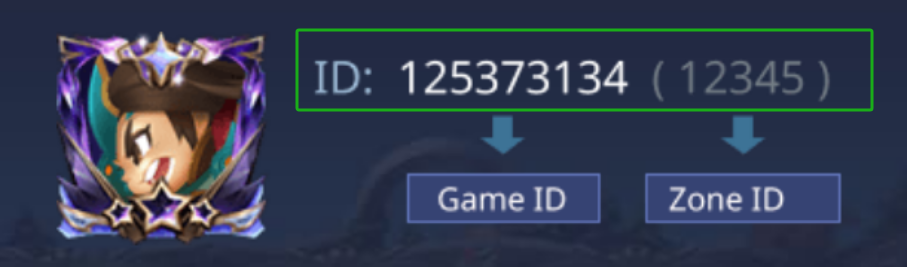
How to find ML User ID and Zone ID?
- Use your account to login the game.
- Click on your avatar in the top-left corner.
- Your ML User ID and Zone ID will be displayed.(e.g. User ID=“12345678”, ZoneID=“1234”)
Important Notes
- This Top Up service is not applicable to United States, Saudi Arabia, Myanmar and Indonesia users.
- Only User ID and Zone ID are required for top-up
- Please enter your account details correctly
- Digital goods are non-refundable once delivered
- Contact UUTOP support if you need assistance
Security Reminder
- Never share your account password with anyone
- UUTOP only requires User ID and Zone ID to top up
- UUTOP is not associated with scams or unauthorized trading platforms
- Always verify your account details before submitting your order
SELECT OPTION




SELECT PAYMENT
Detailed Description
About Mobile Legends: Bang Bang (MY)
Mobile Legends: Bang Bang is a multiplayer online battle arena mobile game where players choose different heroes and team up with others for competitive battles. In-game Diamonds can be used to purchase supported game content such as heroes, skins, bundles, event items, lucky draw events, and other paid in-game items.
Mobile Legends: Bang Bang (MY) is an account top-up service for Malaysia-region players. Enter the correct Mobile Legends User ID and Server ID when placing the order. Once the top-up is completed, the Diamonds or selected content will be delivered directly to the corresponding game account. This product is not a redemption code product and does not require manual code redemption in the game.
Region, account status, game version, event rules, and platform pages may affect available content and display. The final credited content, usage scope, and event availability are subject to the in-game display of Mobile Legends: Bang Bang.
How to Top Up Mobile Legends: Bang Bang (MY)
- Select the Mobile Legends: Bang Bang top-up package you want to purchase.
- Enter the Mobile Legends User ID that should receive the top-up.
- Enter the corresponding Server ID.
- Check the User ID, Server ID, product region, and top-up package.
- Confirm the order details and complete payment.
- Wait for the top-up to be processed.
- After completion, log in to the corresponding Mobile Legends: Bang Bang account and check the Diamonds or selected top-up content.
How to Find Your Mobile Legends User ID and Server ID
- Open Mobile Legends: Bang Bang.
- Log in to the game account you want to top up.
- Tap the avatar in the upper-left corner to open the profile page.
- Check the User ID and Server ID on the profile page.
- The User ID is usually shown as a string of numbers, and the Server ID is usually shown in brackets.
- Copy and check the full User ID and Server ID before placing the order.
Do not use a nickname, character name, phone number, or email instead of the User ID and Server ID. Before submitting the order, make sure the information belongs to the game account you want to top up.
What Mobile Legends Diamonds Can Be Used For
Diamonds can be used according to the features currently available in the game, including:
• Purchasing supported heroes
• Buying skins and cosmetic content
• Buying bundles, event items, or limited-time content
• Joining supported lucky draw events or in-game activities
• Purchasing other paid content currently supported in Mobile Legends: Bang Bang
The number of Diamonds required may vary by hero, skin, bundle, activity, or feature. Please refer to the in-game display.
Why Buy Mobile Legends: Bang Bang (MY) on UUTOP
• Direct top-up to the submitted Mobile Legends account
• No manual code redemption required
• Different top-up packages available
• No game account password or verification code required
• Suitable for Mobile Legends: Bang Bang players who need Diamonds
Check Before Top-Up
• The Mobile Legends User ID is complete and correct.
• The Server ID is complete and correct.
• The User ID and Server ID belong to the intended game account.
• The selected top-up package matches your needs.
• The receiving account can currently receive and use the top-up content.
An incorrect User ID or Server ID may cause the top-up to be delivered to another account. After the top-up is completed, the receiving account cannot be changed, and the top-up cannot be reversed or refunded.
Security Reminder
UUTOP only requires the Mobile Legends User ID and Server ID requested on the order page. Your game account password, OTP, SMS verification code, and other login information are not required.
Check Diamonds and top-up content only through the Mobile Legends: Bang Bang in-game page. Do not enter account passwords or verification codes on unknown links, fake support pages, unofficial websites, or third-party payment requests.
FAQ
Q1: What is Mobile Legends: Bang Bang (MY)?
A: It is a Mobile Legends: Bang Bang account top-up service for Malaysia-region players.
Q2: Is this a redemption code product?
A: No. This is an account top-up service. The selected content will be delivered to the account matching the submitted User ID and Server ID.
Q3: What information is required for top-up?
A: You need to enter the Mobile Legends User ID and Server ID. Your account password, OTP, and verification code are not required.
Q4: How do I find my User ID and Server ID?
A: Open the game and go to the profile page. The User ID is usually displayed on the profile page, while the Server ID is usually shown in brackets.
Q5: What can Diamonds be used for?
A: Diamonds can be used to purchase supported heroes, skins, bundles, event items, lucky draw events, and other paid in-game content.
Q6: How do I check whether the top-up has arrived?
A: Log in to the Mobile Legends: Bang Bang account submitted during checkout and check whether the Diamonds or selected content has been updated.
Q7: Can the User ID or Server ID be changed after the top-up is completed?
A: No. After completion, the receiving account cannot be changed and the top-up cannot be reversed. Please confirm the User ID and Server ID before payment.
Q8: Can a completed top-up be refunded?
A: No. A completed top-up cannot be refunded.