usEN
$USD
user

How to Buy Poppo Coins: Complete Poppo Live Purchase Guide

Elena CarterElena Carter

You can buy Poppo Coins through Poppo Live recharge services by entering your Poppo ID and selecting the Coins package you need. On UUTOP, this is a direct User ID top-up: you pick a package, enter the receiving account's User ID, pay, and the Coins are delivered to that account. No redeem code is issued, and no password or verification code is required.

Poppo Live Coins (Global)
5000 Coins

5000 Coins

$0.56

Buy


10,000 Coins

10,000 Coins

$1.16

Buy
25,500 Coins

25,500 Coins

$2.81

Buy

What Do You Need Before Buying Poppo Coins?

Have these ready before you open a checkout page:
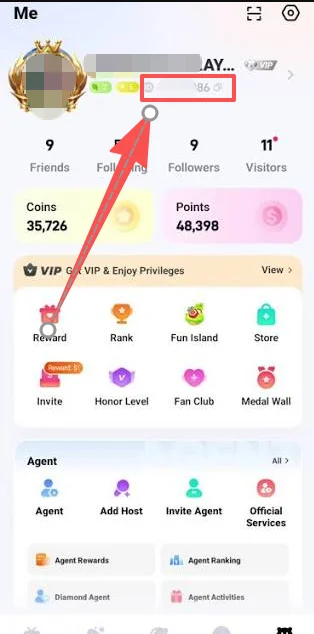
  • Your Poppo Live ID (User ID). Open Poppo Live, go to your Profile, Me, or account information page, and copy the numeric User ID shown with your profile. Menu names vary by app version. Copy and paste it instead of typing it, and use the ID, not your nickname.

poppo live id.png

  • A Coins package. Work out how many Coins you need for your Poppo Coins purchase (see the short calculation below). To compare package prices first, see the Poppo Live Coins price guide.
  • A payment method accepted at checkout.

Where Can You Buy Poppo Coins?

There are three main ways to buy Poppo Coins. Availability depends on your account and region.

MethodWhat you useHow Coins arriveCheck before paying
Poppo Live appThe account you are signed in toAdded to that account after the in-app purchaseApp-store account, package, currency, total
Official Poppo web pageFollow the page's current sign-in and checkout promptsAdded according to the order on that pageWebsite domain, receiving account, total
Direct User ID top-up (UUTOP)The receiving account's User ID onlyDelivered to the account linked to the IDProduct region, User ID, package, order status

In the app, the general flow is: sign in to the right account, open the Coin or recharge section, choose a package, and complete the in-app purchase. Labels vary by version. Poppo's official site states it is operated by Poppo Live; follow its current on-screen prompts rather than an old screenshot.

A direct User ID top-up is useful when you want browser checkout without giving out your login, or when you are topping up another person's account with their permission. Compare the price per 1,000 Coins across the options you have before choosing. For a longer walkthrough, see UUTOP's Poppo Live top-up guide.

How to Buy Poppo Coins Step by Step

This is how to buy coins in Poppo Live through a direct top-up on UUTOP:

  1. Open Poppo Live and copy your User ID from the account that should receive the Coins.
  2. Choose a Poppo Coins package on the Poppo Live Coins (Global) page.
  3. Enter your User ID and check every digit against the app.
  4. Review the order and complete payment. Confirm the product, package, User ID, and final total, then pay with a method offered at checkout.
  5. Wait for processing. After payment is confirmed, the Coins are delivered directly to the account linked to the User ID.
  6. Check your balance. Reopen Poppo Live, make sure you are signed in to the right account, and confirm the Coins arrived.

Ready to start? Poppo recharge on UUTOP →

TOP UP Poppo Live Coins ON UUTOP

TOP UP Poppo Live Coins ON UUTOP
  • 100% Authentic — Sourced from trusted global publishers.
  • Instant Delivery — Automated delivery in seconds.
  • 24/7 Support — Multilingual help anytime.
TOP UP NOW

Once an order is processing, the User ID and package cannot normally be changed, so check both before you pay.

How Many Poppo Coins Should You Buy?

Check the Coin cost of the gift or feature inside Poppo Live, then subtract your current balance:

Coins to buy = planned Coin spend − current Coin balance

For example, if a gift costs 20,000 Coins and you already have 13,000, you need 7,000 more. Choose the smallest package that covers the difference. For a full price table and cost per 1,000 Coins, see the price guide.

Mistakes to Avoid When Buying Poppo Coins

  • Entering a nickname instead of the User ID. Only the numeric ID identifies the receiving account.
  • Choosing the wrong product or region. Confirm the product supports your account before paying.
  • Sharing login details. A User ID top-up never needs your password, email password, OTP, or verification code. Stop if anyone asks for them.
  • Reordering too soon. If the first order is still processing, do not submit the same package again.

Why Choose Online Poppo Coins Recharge?

  • Convenience. No code to redeem and no login to hand over. You paste a User ID and pay.
  • Clear ordering. The package, price, and User ID are all confirmed on one page before you pay.
  • It is not right for everyone. Orders cannot be changed or refunded once processing starts, and it only works for eligible accounts. If in doubt, start with a small package.

FAQ

How long does Poppo Coins recharge take?

Processing starts after payment is confirmed. Delivery time can vary, so follow your order status instead of expecting a fixed time.


What information is needed to buy Poppo Coins?

Only your Poppo Live User ID and a Coins package. UUTOP does not ask for your password or verification codes.


Can I recharge Poppo for another account?

Yes. Get the owner


What if I enter the wrong User ID?

The Coins may go to another account and may not be recoverable. Contact UUTOP support immediately if you notice before processing begins.


What if my Coins do not arrive?

Reopen Poppo Live and check that the order


Writer
Elena Carter

Elena Carter

Content Writer & Strategy Guide Editor

Elena Carter is a content writer at UUTOP who focuses on creating clear, practical, and engaging articles. She is committed to helping readers quickly understand useful information and enjoy a smoother reading experience.