

MLBB Diamonds Top Up Guide: How to Choose the Right MLBB Diamond Package

The cheapest displayed package is not always the best value, and the largest package is not automatically the right purchase. Compare packages according to what you receive, what you plan to buy, and the final checkout amount.
Match the Package to Your Planned Purchase
Different players have different priorities:
- Occasional buyers: Choose a smaller package that covers a specific skin, gift, or item.
- Event participants: Estimate the Diamonds needed for the intended event before buying.
- Regular spenders: Compare the live price per Diamond across suitable packages.
- First-time buyers: Consider starting with a smaller order so you can confirm the account details and delivery process.
A package is good value when it supports your intended purchase at an acceptable final cost—not simply because it contains more Diamonds.
How to Top Up MLBB Diamonds on UUTOP
Step 1: Open the UUTOP MLBB Top-Up Page
Go to UUTOP and locate the Mobile Legends: Bang Bang top-up product. Confirm the product name and eligibility information before choosing a package.
Use the current product page as the source for available packages and order requirements.
Step 2: Select a Diamond Package
Compare the listed Diamond amounts and choose one that fits your planned purchase. Check whether the displayed amount includes any bonus component or special delivery condition.
Review the selected quantity as well. Increasing the quantity may add multiple copies of the same package.
Step 3: Enter Your User ID and Zone ID
Enter the two account identifiers into their corresponding fields. Compare them with the information shown in your MLBB profile before continuing.
Do not enter your nickname or password. The delivery system uses the numerical account details to identify where the Diamonds should be sent.
Step 4: Review the Order and Complete Checkout
Before paying, confirm:
- The selected game is Mobile Legends: Bang Bang.
- The Diamond package is correct.
- The order quantity is correct.
- The User ID and Zone ID match your profile.
- The final total matches your intended purchase.
Choose an available checkout option and complete the payment. Keep the order number or confirmation until the Diamonds appear in the game.
Step 5: Check Your Diamond Balance
Return to Mobile Legends and review your Diamond balance. If the game was already open during the purchase, refresh the relevant screen or restart the app.
If the balance has not changed, check the existing order before submitting another purchase.
Why Use UUTOP for an MLBB Diamonds Top Up?
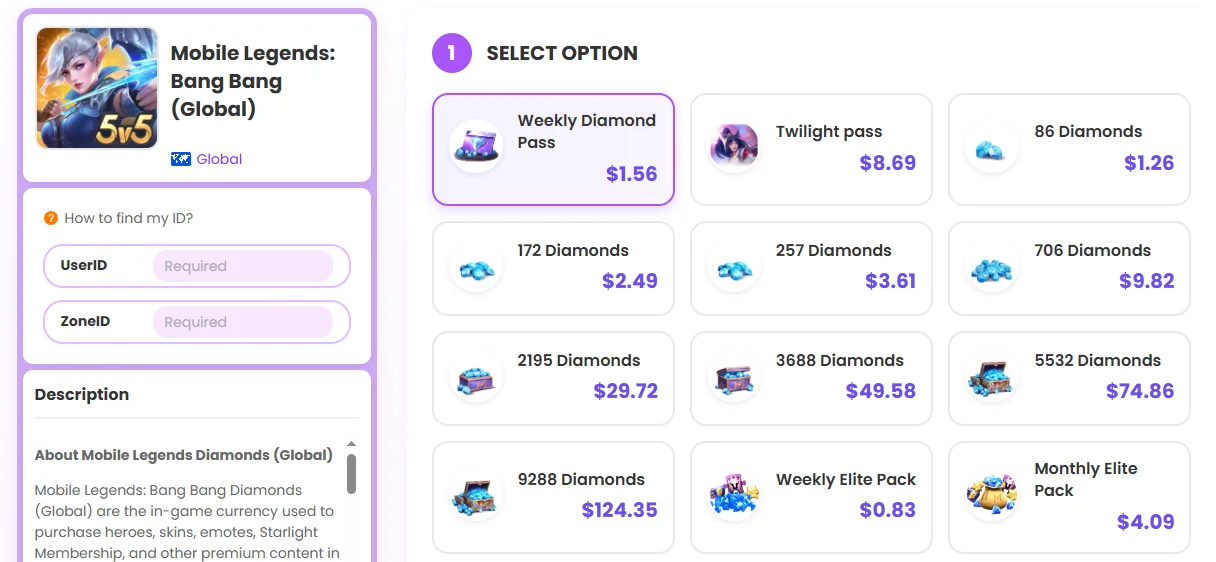
UUTOP keeps package selection, account information, order review, and checkout within one purchase flow. This allows players to see what they are ordering and verify the submitted details before paying.
For a smooth recharge:
- Choose the correct MLBB product.
- Enter the User ID and Zone ID accurately.
- Check the package quantity and final total.
- Keep the order confirmation.
- Review the existing order status before buying again.
Frequently Asked Questions
Is it safe to buy MLBB Diamonds from a third-party platform?
It can be safe when the platform clearly shows the package details, final price, support information, and order confirmation. Avoid services that ask for your Mobile Legends password.
How do I compare MLBB Diamond packages?
Compare the number of Diamonds you receive, the final checkout price, and what you actually plan to buy in the game. A larger package is not always the best value for every player.
What should I check before buying MLBB Diamonds?
Check the product, Diamond amount, final order total, and the account information required for delivery. You should also make sure the platform provides clear support and order records.
