
All-In-One Bundle
$0.00
Buy
 EN

Players can recharge Genshin Impact through three main routes: the in-game Shop, the official HoYoverse Top-Up Center, or a UID-based top-up service such as UUTOP.
The in-game Shop and HoYoverse Top-Up Center are official purchase channels. UUTOP provides a separate direct recharge option that delivers Genesis Crystals or the Blessing of the Welkin Moon to the UID and server submitted with the order. No HoYoverse password or verification code is required for this UID top-up method.
This guide compares various available methods, explains how to purchase items, and outlines the points that should be verified before making a payment.
If you are planning to top up Genshin Impact items via UUTOP, please ensure that you enter the correct UID.
 Genshin Impact
| Recharge method | Information required | Main advantages | What to check |
| In-game Shop | Access to the logged-in game account | Purchase directly from inside Genshin Impact | Platform billing and displayed regional price |
| HoYoverse Top-Up Center | HoYoverse account login | Official website purchase method | Selected server, character and product |
| UUTOP UID top-up | UID and server | No account password required | UID, server, package and quantity The best method depends on where you play, which payment options are available in your region, and whether you prefer signing in or using a direct UID recharge. |
UUTOP currently offers the following top-up items:
can be used for:
1.Intertwined Fates for limited Character Event Wishes and Weapon Event Wishes
2.Acquaint Fates for the permanent Wanderlust Invocation、
3.Original Resin replenishment
Genesis Crystals are the more practical option when you need currency immediately or want to purchase an item that specifically requires Crystals.
Each Blessing of the Welkin Moon provides:
1. 300 Genesis Crystals immediately
2. 90 Primogems per day for 30 days
3. 2,700 Primogems from daily login claims
4. 3,000 total premium currency when the initial Genesis Crystals are included
Welkin Moon is intended for players who log in consistently. If you miss a day, the unclaimed 90 Primogems for that day are not normally reissued.
The HoYoverse Top-Up Center is the official website recharge method. The products and payment methods shown may vary according to the account and region.
To recharge through the official website:
Open the Genshin Impact HoYoverse Top-Up Center.、Sign in with the HoYoverse account linked to your game progress.、Select the correct Genshin Impact server.、Confirm the displayed character and UID. 、Choose Genesis Crystals, Welkin Moon or another available product.、Select a supported payment method.、Review the order and complete the payment.、Open the game and check the relevant balance or purchase status.
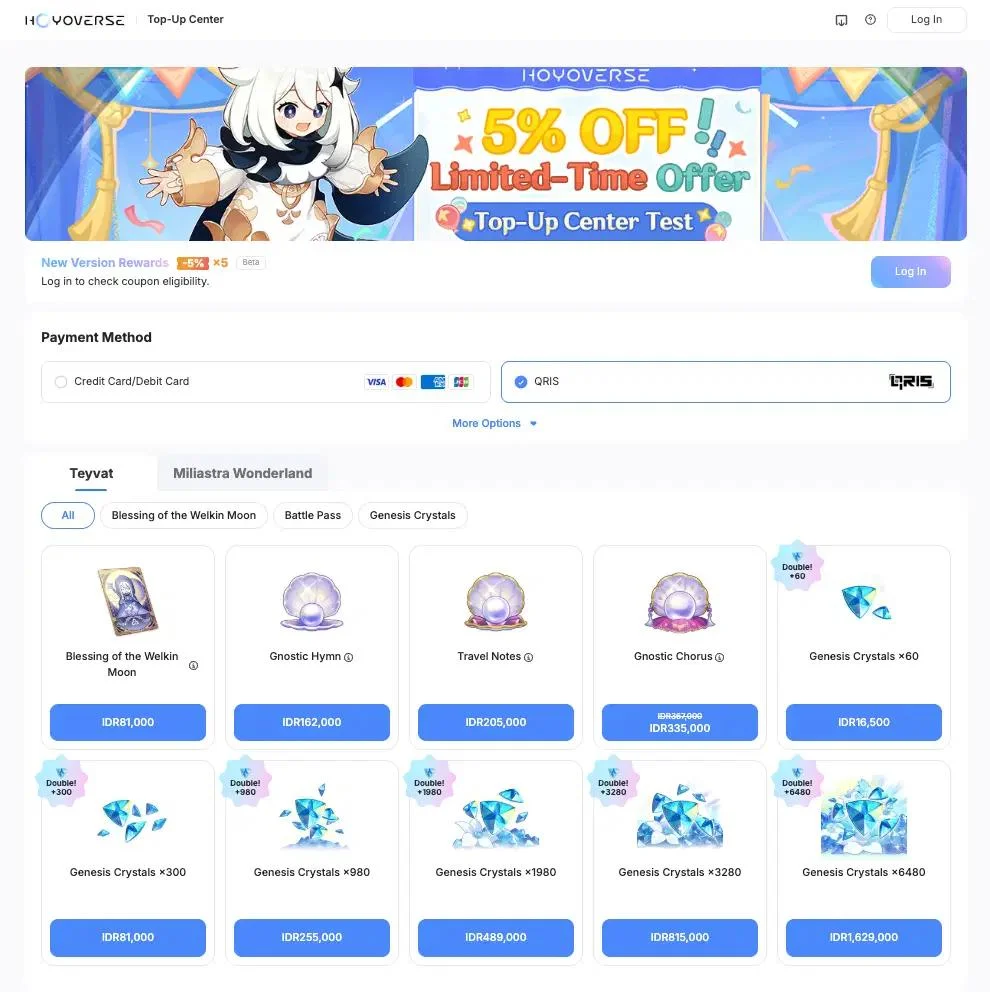 Always confirm the displayed character before paying, especially if the HoYoverse account contains game progress on more than one server.
Follow these steps:
Launch Genshin Impact.、Log in to the correct account and server.、Open the Paimon Menu.、Select Shop.、Open Crystal Top-Up for Genesis Crystals or locate the Blessing of the Welkin Moon.、Select the product you want.、Review the displayed price and bonus information.、Complete the purchase using the payment system available on your platform.
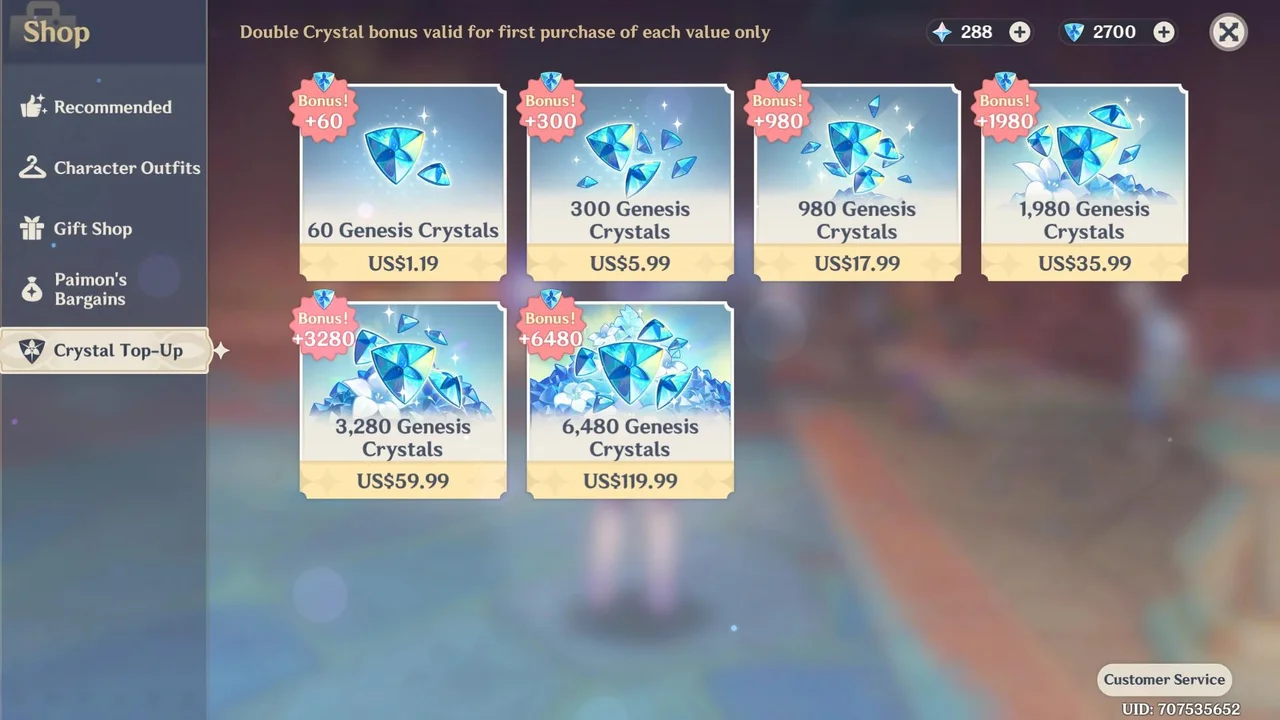 The account currently logged into the game will receive the purchase. Before paying, confirm that you are playing on the intended server and character.
UUTOP offers a UID-based recharge option for eligible Genshin Impact regions. The service currently lists Genesis Crystal packages and the Blessing of the Welkin Moon. You can select the options you need to make a purchase.
Unlike the official Top-Up Center, this method does not require you to sign in with a HoYoverse account. The order is processed using the UID and server entered at checkout.
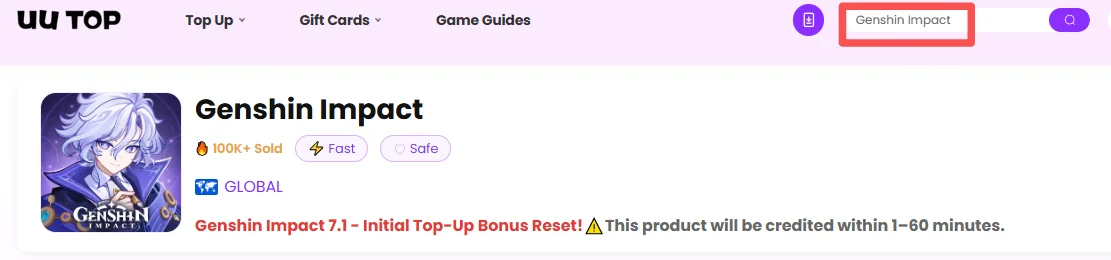
2.Choose the required package.
3.Enter the receiving account’s complete UID.
4.Select the server connected to that UID.
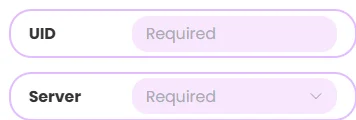
5.Check the product, quantity, UID and server.
6.Choose an available payment method.

7.Complete the payment.Then wait for the top-up to be credited.
The purchase is delivered to the account associated with the submitted UID and server. A HoYoverse password, email login, security code or verification code is not required.
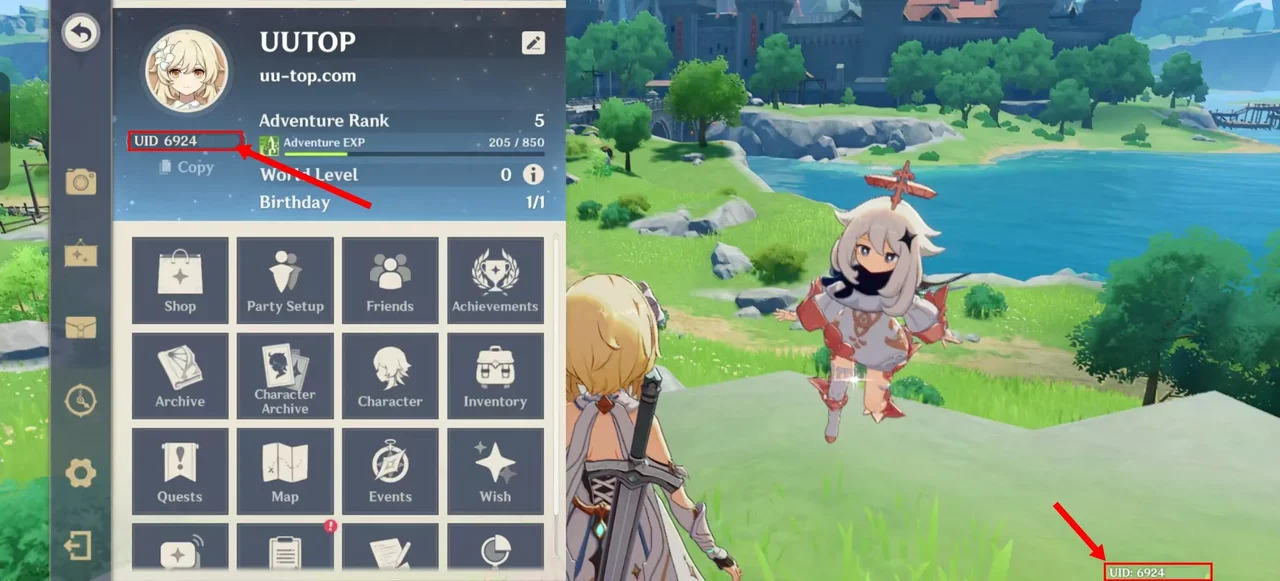
Your UID identifies the account that will receive the recharge. It is displayed:
Choose the in-game Shop if you want to purchase directly while logged into the receiving account. This reduces the need to enter a UID manually, but the available payment options depend on the device platform.
Choose the HoYoverse Top-Up Center if you prefer an official browser-based purchase. This method requires you to sign in and confirm the receiving character.
Choose a UUTOP UID top-up if you prefer to recharge with a UID and server without entering the HoYoverse password. This can also be useful when the payment options shown on the relevant UUTOP regional page better match your needs.
Regardless of the method, compare the final checkout amount, available product, bonus status and account information before paying.
A UID top-up is processed using the information submitted with the order. Copy the UID from the game instead of entering it from memory.
The server must contain the character that should receive the purchase. An incorrect server selection can route the order to the wrong game data or prevent it from being completed correctly.
Genesis Crystals and Welkin Moon provide different benefits. Confirm that you have selected the intended product and package size.
Check the Crystal Top-Up page in the receiving account if the first-purchase bonus affects your decision.
Save the order number and payment record until the product has appeared in the game. These details will be needed if customer support must investigate the order.
If Genesis Crystals or Welkin Moon do not appear after payment:
If the purchase was made through UUTOP, provide UUTOP Support with the order number, UID and selected server. Do not submit the same order repeatedly while the original payment is still being processed.
TOP UP GENSHIN IMPACT ON UUTOP
No. UUTOP’s Genshin Impact UID top-up requires the receiving account’s UID and server. Do not provide your password, login code or verification code.
A UID recharge can be sent to another eligible account if you have the correct UID and server. Ask the recipient to confirm both details before payment.
Contact customer support as soon as the error is discovered. Once a digital product has been delivered to the submitted account, it may not be possible to cancel, transfer or redirect it.
Violet is a gaming content writer specializing in HoYoverse titles, gacha games, and popular live-service games. From character builds and update guides to in-game currency explanations, Violet turns complex information into clear, practical advice. With a strong focus on accuracy, value, and player needs, each guide is designed to help players save time, manage resources wisely, and enjoy a smoother gaming experience.


